


Table of Contents
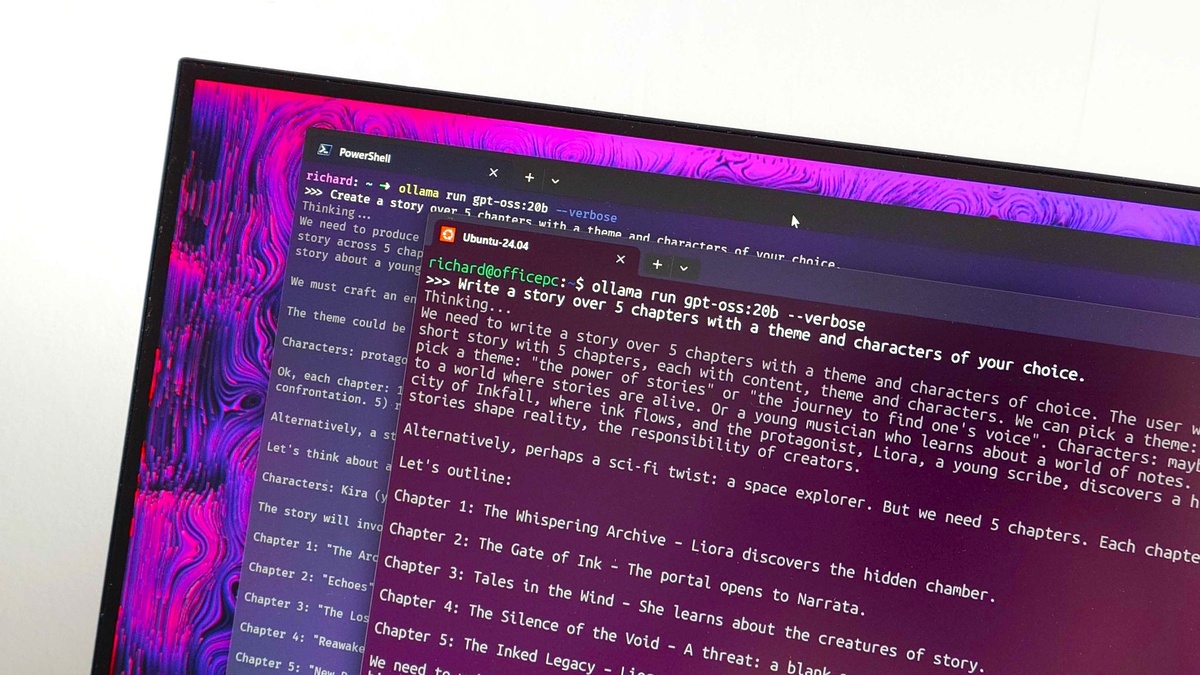
Enterprise computing enters a defining transition as Microsoft formally confirms the PowerShell 7 Windows Upgrade, replacing legacy Windows PowerShell 5.1 with modern PowerShell 7 as the default command-line automation engine across upcoming Windows client releases.
Revealed through official engineering documentation and community briefings, the planned PowerShell 7 Windows Upgrade marks the long-awaited unification of native operating system administration with modern cross-platform .NET runtime speed and open-source tooling.
| Core Technical Dimension | Windows PowerShell 5.1 (Legacy) | PowerShell 7 (Modern In-Box) | Enterprise Operational Impact |
|---|---|---|---|
| Underlying Runtime Engine | Monolithic .NET Framework 4.8 | Cross-Platform Modern .NET Runtime | Delivers multi-core scaling and eliminates memory overhead |
| Operating System Delivery | Fixed In-Box System Component | Modular MSIX via Microsoft Store Pipeline | Decouples command-line patches from yearly OS updates |
| Pipeline Concurrency | Single-Threaded Sequential Loops | Native ForEach-Object -Parallel Switch | Accelerates fleet-wide orchestration up to sixfold |
| Structured Data Processing | Legacy JavaScriptSerializer Engine | Optimized System.Text.Json Architecture | Executes JSON serialization up to ten times faster |
| Enterprise Remoting Protocol | WS-Management (WinRM) Protocol Only | Native OpenSSH alongside WS-Management | Standardizes cross-platform security without open WinRM ports |
| Servicing & Support Status | Officially Deprecated (Servicing Only) | Active Mainstream Engineering Roadmap | Freezes legacy features permanently; all new cmdlets target PS7 |
| System Capability Cmdlets | Native DISM System-Level Integration | MSIX Elevation Bridging In Progress | Requires interim fallback stubs during initial OS staging |
Architectural Shift From Legacy .NET Framework to Modern Runtime
For years, administrators managed enterprise infrastructure on Windows PowerShell 5.1, a legacy platform mirroring how software phases out as explored in HauntysTech’s coverage of how NVIDIA ends Windows 10 support for PC gamers.
While the engineering team developed modern PowerShell across multi-platform GitHub repositories, the core PowerShell 7 Windows Upgrade remained delayed by foundational operating system dependencies, enterprise backward compatibility requirements, and deeply embedded machine-wide management routines.
Windows PowerShell 5.1 served as the bedrock for global enterprise infrastructure, driving scheduled maintenance tasks, local services, hypervisor orchestration, and complex administrative scripts without requiring secondary installation pipelines or third-party runtime package managers.
However, the fundamental architectural limitations of .NET Framework prevented legacy console environments from benefiting from memory allocation enhancements, modern JSON processing algorithms, and asynchronous processing capabilities introduced across contemporary computing standards.
By shifting the underlying platform to modular .NET runtime technologies, Microsoft delivers orders-of-magnitude improvements in execution speed, memory footprints, and cross-platform script parity across desktop environments, enterprise clusters, and modern cloud instances.
How PowerShell 7 Windows Upgrade Overhauls Operating System Automation
Senior product manager Jason Helmick detailed how the upcoming PowerShell 7 Windows Upgrade bridges historical ecosystem fragmentation, establishing a single authoritative command-line interface that satisfies both modern developer needs and mission-critical production reliability.
Microsoft documented the roadmap under update bulletin KB5137172, outlining how upcoming client builds will integrate PowerShell 7 directly into system images rather than relegating the modern shell to voluntary secondary package installations.
Crucially, the planned PowerShell 7 Windows Upgrade does not immediately sever legacy compatibility, enabling side-by-side coexistence so production automation routines, background management jobs, and administrative pipelines continue uninterrupted while engineering teams audit their environments.
Enterprise fleets migrating from earlier operating system baselines will maintain access to legacy console binaries, ensuring that older Active Directory modules, proprietary COM object invocations, and specialized management scripts avoid sudden execution failures.
This measured deployment philosophy allows corporate administrators to adopt modern command-line syntax and performance features at their own velocity while verifying critical organizational scripts against the refreshed underlying execution engine.
MSIX Packaging Gaps and Enterprise Deployment Roadblocks

Despite immense enthusiasm surrounding the PowerShell 7 Windows Upgrade, Microsoft acknowledged several pivotal packaging and privilege hurdles that the engineering team must resolve before PowerShell 7 can completely replace legacy console binaries.
Modern PowerShell is distributed as an MSIX package, a modern application container architecture that introduces distinct behavioral differences when contrasted with traditional MSI installers or native Windows system components.
Most notably, executing automation under the local SYSTEM account presents acute privilege challenges, impacting enterprise scheduled tasks, centralized device management agents, automated monitoring daemons, and low-level administrative background services.
Furthermore, vital system servicing tools such as Deployment Image Servicing and Management cmdlets currently exhibit execution barriers, preventing administrators from invoking commands like Add-WindowsCapability directly through the packaged environment.
To overcome these roadblocks ahead of deployment, Microsoft established a dedicated Inbox Working Group tasked with remediating machine-wide profile configurations, all-users path variables, and service elevation boundaries before the PowerShell 7 Windows Upgrade rolls out.
Evaluating PowerShell 7 Windows Upgrade Compatibility Across Enterprise Scripts
Achieving seamless execution during the PowerShell 7 Windows Upgrade requires comprehensive script auditing across corporate repositories, as architectural deviations between .NET Framework and modern .NET runtime libraries inevitably trigger syntax or module incompatibilities.
To assist administrators during fleet migration, Microsoft is enhancing PSScriptAnalyzer with compatibility rules that automatically scan codebases, identify deprecated cmdlets, and recommend modernized alternatives prior to production deployment.
Scripts relying on legacy WMI cmdlets like Get-WmiObject must transition to modern CIM cmdlets, ensuring that administrative queries function properly following the widespread rollout of the PowerShell 7 Windows Upgrade across internal networks.
For enterprise modules that strictly depend on .NET Framework assemblies, PowerShell 7 provides a built-in compatibility layer via the UseWindowsPowerShell parameter, orchestrating an out-of-process background proxy session to execute legacy commands transparently.
While this emulation bridge prevents immediate workflow disruption, enterprise IT leaders must treat proxy invocation as a temporary stopgap rather than a permanent operational foundation for mission-critical automation.
Servicing Timelines and the Retirement of Windows PowerShell 5.1
The transition schedule established by Microsoft confirms that Windows 11 version 26H2 represents the final release shipping with legacy Windows PowerShell 5.1 designated as the primary default automation runtime.
Beginning with version 27H2, anticipated in late 2027, the PowerShell 7 Windows Upgrade takes full effect, making PowerShell 7 the default console environment out of the box across both consumer installations and commercial enterprise SKUs.
| Enterprise Workload Domain | Windows PowerShell 5.1 Status | PowerShell 7 Native Support | Compatibility Rating | Migration Remediation Strategy |
|---|---|---|---|---|
| Active Directory & Domain Services | Fully Supported via .NET Framework | Supported via Compatibility Proxy Layer | 98% Compatible | Audit custom binary cmdlets; test CimSession endpoints |
| DISM & OS Image Servicing | Fully Supported Native Integration | Blocked by MSIX Elevation Boundaries | Remediation Pending | Maintain legacy 5.1 scripts for offline image servicing |
| Local SYSTEM Scheduled Tasks | Fully Supported System Execution | Restricted under Container Permissions | Remediation Pending | Run tasks via classic MSI binaries or delegate via stubs |
| Cloud REST APIs & Webhooks | Sluggish WebClient Implementation | High-Speed HttpClient Implementation | 100% Native Support | Immediately refactor cloud scripts to modern Invoke-RestMethod |
| Legacy PSSnapin Assemblies | Fully Supported Legacy Architecture | Permanently Unsupported Architecture | Incompatible | Port binary snap-ins to standardized PowerShell modules |
| High-Volume Batch Processing | Requires Manual Runspace Architecture | Native Multi-Threaded -Parallel Syntax | 100% Native Support | Refactor serial loops to leverage workstation CPU threads |
Simultaneously, Microsoft officially classified Windows PowerShell 5.1 as deprecated, freezing feature development permanently while restricting ongoing engineering commitments strictly to critical security patches and latent vulnerability remediation.
In subsequent operating system updates, Microsoft plans to remove legacy PowerShell binaries from default desktop media entirely, converting the historic engine into an optional Feature on Demand for specialized legacy workloads.
This gradual phasing model guarantees that organizations preparing for the PowerShell 7 Windows Upgrade enjoy adequate runway to modernize their tooling without risking catastrophic operational downtime across legacy server farms or client machines.
Critical Command-Line Benchmarks and Performance Gains
Empirical performance testing demonstrates why the PowerShell 7 Windows Upgrade represents a massive generational leap for sysadmins, beginning with data parsing throughput that dramatically surpasses legacy .NET Framework execution speeds.
By adopting System.Text.Json as its core serialization engine, PowerShell 7 parses complex enterprise payloads up to ten times faster than the sluggish JavaScriptSerializer utilized throughout Windows PowerShell 5.1.
Sysadmins running large configuration scripts gain immediate efficiency via the ForEach-Object -Parallel switch, scaling execution across multi-core processors like the AMD Ryzen 7 9800X3D gaming CPU.
Cold console startup latency decreases noticeably under the modern .NET runtime, reducing process spawn delays across automated CI/CD runners, terminal sessions, and ephemeral orchestration containers.
These measurable architectural improvements confirm that completing the PowerShell 7 Windows Upgrade delivers tangible business value beyond mere software modernization, directly boosting administrator productivity and system responsiveness.
Strategic Playbook for Enterprise Fleets Adopting Modern Shells
Successfully navigating the PowerShell 7 Windows Upgrade demands a proactive administrative roadmap that begins with complete inventory discovery across endpoints, identifying automated scheduled tasks, maintenance routines, and legacy desktop provisioning scripts.
Corporate infrastructure teams should deploy PowerShell 7 side by side with existing installations immediately, allowing engineers to validate production scripts against modern runtime libraries without disturbing active production services.
Establishing internal code review standards and enforcing PSScriptAnalyzer rules within continuous integration pipelines ensures that new automation authored today remains fully prepared for the mandatory PowerShell 7 Windows Upgrade.
Departments must update internal documentation, educating administrators on modern syntax patterns, cross-platform remoting, and unified management across Windows and Apple Silicon workstations like the Apple M4 Mac mini desktop.
By taking systematic preparatory action well ahead of Windows 11 version 27H2, enterprise technology departments can transition smoothly and unlock the full operational potential of modern command-line management.
Frequently Asked Questions
When will PowerShell 7 become the default experience in Windows?
The PowerShell 7 Windows Upgrade will officially debut with the release of Windows 11 version 27H2, currently scheduled for general availability in late 2027, while version 26H2 remains the final release featuring legacy 5.1 by default.
Will the PowerShell 7 Windows Upgrade break existing enterprise scripts?
Most administrative scripts will run seamlessly during the PowerShell 7 Windows Upgrade, though routines relying on deprecated WMI cmdlets or legacy binary .NET Framework assemblies may require refactoring or execution through the compatibility proxy layer.
Can Windows PowerShell 5.1 and PowerShell 7 run side by side?
Yes, PowerShell 7 and Windows PowerShell 5.1 install and execute independently side-by-side, allowing administrators to transition their production automation tasks gradually without risking unexpected disruption to active background tasks.
Why did Microsoft deprecate Windows PowerShell 5.1?
Windows PowerShell 5.1 is tied to the monolithic .NET Framework, making feature updates impossible without compromising OS stability; deprecating it allows Microsoft to focus entirely on the modular, open-source PowerShell 7 platform.
How will PowerShell 7 be updated on client machines?
PowerShell 7 is packaged as an MSIX application delivered in-box and updated seamlessly through Microsoft Store and winget pipelines, providing rapid security patches without requiring full Windows operating system upgrades.
Final Engineering Verdict: Preparing Enterprise Fleets for 2027
Microsoft’s decision to execute the PowerShell 7 Windows Upgrade marks a long-overdue milestone in Windows systems engineering, finally retiring an aging command-line foundation in favor of a fast, open, and cross-platform automation ecosystem.
While packaging nuances and SYSTEM account privileges remain in active remediation, the dual-engine transition window gives enterprise organizations the ideal operational runway to modernize mission-critical automation scripts without emergency downtime.
System administrators who proactively audit their automation fleets and embrace modern syntax will maximize the speed, security, and scalability unlocked by the definitive PowerShell 7 Windows Upgrade across enterprise infrastructure.
