


Table of Contents
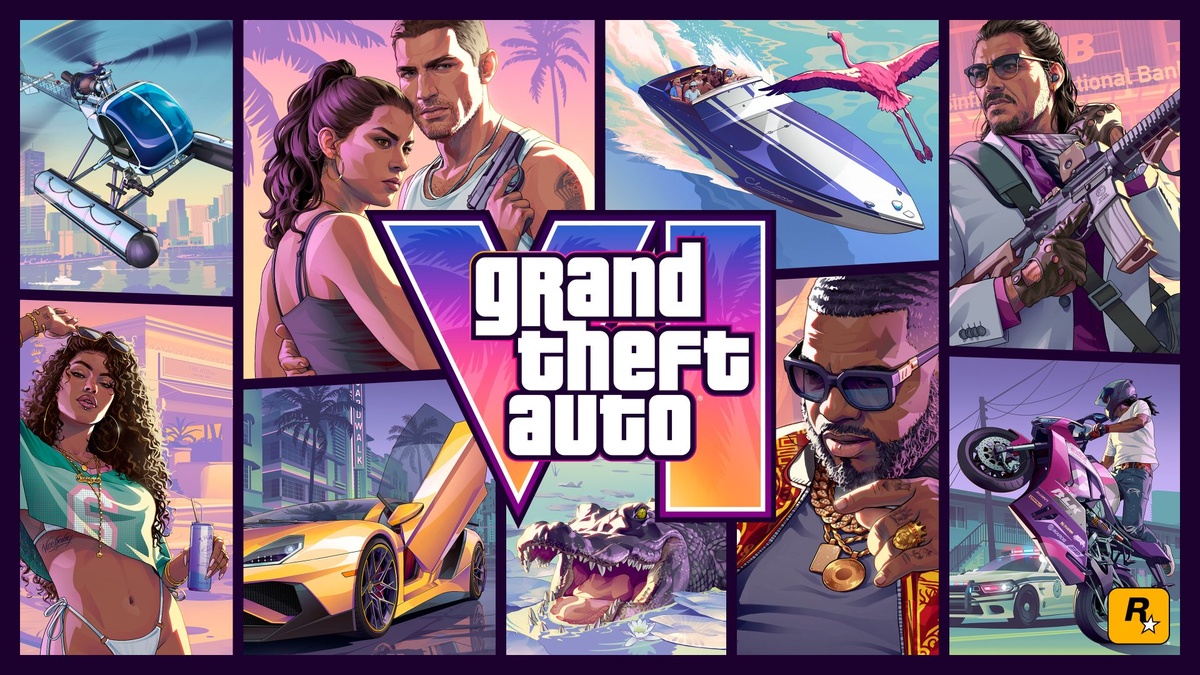
Gaming enthusiasts preparing for Rockstar Games monumental open world can now circumvent physical hardware upgrades through Microsoft server infrastructure. Official deployment documentation reveals how remote datacenter blades deliver Vice City directly to screens without requiring local compute installations.
Comprehensive validation of GTA 6 Xbox Cloud Gaming confirms support across legacy Xbox One consoles, modern Series X|S hardware, and portable devices. Players can access pristine open-world adventures immediately while saving precious solid-state drive capacity across their personal gaming setups.
Evaluating performance metrics across remote datacenter streaming, localized console hosting, and native solid-state installations clarifies how GTA 6 Xbox Cloud Gaming compares against dedicated rendering hardware.
| Platform Delivery Mode | Rendering Engine Profile | Target Output & Bitrate | Local Storage Required | Session Time Allowance | Network Requirements |
|---|---|---|---|---|---|
| Xbox Cloud Gaming (xCloud) | Custom Series S Blade Server | 1080p @ 30/60 FPS (15 Mbps) | 0 GB (Zero Local Install) | 15 Hours/Month (Expandable) | 20+ Mbps Low-Jitter Internet |
| Xbox Remote Play (Direct) | Host Xbox Series X Console | 1080p @ 60 FPS (H.264/HEVC) | Full Install on Host Console | Unlimited Personal Streaming | 15 Mbps Upload / Wi-Fi 6 |
| Xbox Remote Play (Series S) | Host Xbox Series S Console | 1080p @ 30 FPS Streamed | Full Install on Host Console | Unlimited Personal Streaming | 15 Mbps Upload / Wi-Fi 6 |
| Native Xbox Series X Install | Direct Custom RDNA2 GPU | Dynamic 4K @ 30/60 FPS | 150+ GB Internal NVMe SSD | Unlimited Native Offline Play | Offline Single-Player Supported |
Analyzing these distinct architecture modes demonstrates how GTA 6 Xbox Cloud Gaming eliminates modern storage bottlenecks while maintaining consistent visual parity across disparate client form factors.
Architecture Overview: How GTA 6 Xbox Cloud Gaming Streams to Legacy Hardware
Expanding access across multiple console generations remains one of the greatest engineering feats surrounding Rockstar Games flagship release. Through GTA 6 Xbox Cloud Gaming, legacy Xbox One owners gain immediate entry into the neon-soaked streets of Vice City without purchasing ninth-generation machinery.
Powering GTA 6 Xbox Cloud Gaming, the underlying server architecture utilizes custom Microsoft datacenter racks equipped with specialized system-on-chip silicon derived from modern Xbox architectures. By routing video frames over low-latency WebRTC streams, players interact with living city simulations hosted entirely hundreds of miles away.
Storage limitations represent a persistent frustration for modern players facing massive hundred-gigabyte file installations on constrained solid-state drives. Running GTA 6 Xbox Cloud Gaming bypasses internal drive writes entirely, liberating valuable storage blocks on hardware like the Series S.
Furthermore, players who migrate between different household rooms or office environments can resume criminal enterprises seamlessly without file duplication. The server automatically syncs cloud game saves, character progression flags, and cosmetic unlocks instantly across every authorized client screen.
Industry analysts note this cloud distribution milestone marks a pivotal transition for massive open-world titles demanding modern graphical capabilities. Connecting to GTA 6 Xbox Cloud Gaming proves that generational divides no longer prevent dedicated franchise veterans from exploring expansive virtual sandboxes.
To achieve optimal frame pacing during high-speed police chases and helicopter escapes, server instances prioritize continuous frame transmission over aggressive compression. This balanced encoding methodology minimizes visual artifacting across high-frequency foliage, asphalt reflections, and rapid camera pans.
Technical Profile: Cloud Rendering and Xbox Series S Graphical Parity
Understanding the graphical fidelity delivered through remote pipelines requires examining Microsoft datacenter hardware configurations. Official technical disclosures establish that GTA 6 Xbox Cloud Gaming executes code utilizing optimized Xbox Series S graphical profiles during cloud streaming sessions.
Deploying Series S rendering profiles ensures rigorous computational stability, dynamic resolution scaling, and steady thermal efficiency across datacenter blades. By locking rendering targets to standardized hardware profiles, server engineers preserve tight frame-time consistency during complex physics interactions.
Visual assets such as volumetric cloud cover, pedestrian crowd density, and vehicle deformation receive tailored optimizations matching compact home consoles. While native installations on high-end hardware leverage expanded ray tracing, GTA 6 Xbox Cloud Gaming delivers remarkably stable ambient lighting across humid coastal vistas.
Audio telemetry also benefits from specialized cloud compression algorithms that package spatial acoustics and multi-channel vehicular soundscapes into efficient streams. Enthusiasts experiencing GTA 6 Xbox Cloud Gaming through stereo headphones or home theater setups enjoy rich environmental audio without perceptible fidelity degradation.
Evaluating competitive compute performance demonstrates how cloud blades compare with modern silicon like the AMD Ryzen 7 9800X3D flagship gaming processor when managing heavy game logic. Server clustering offloads demanding pedestrian artificial intelligence routines effortlessly across distributed processing nodes.
Ultimately, this graphical baseline ensures millions of players enjoy uniform gameplay pacing regardless of whether they connect from an older console or browser. The unified visual profile eliminates unexpected performance hitches during intense story cutscenes and dynamic tropical thunderstorms.
Network Optimization: Wired Ethernet Latency and Bitrate Stability
Real-time cloud interaction requires rigorous network infrastructure to prevent controller lag from disrupting tense vehicular maneuvers and precision shooting. Network engineers investigating GTA 6 Xbox Cloud Gaming stress the vital role played by stable transmission pipelines and low-jitter packet routing.
While high-speed wireless networks boast impressive download figures, packet bursts and wireless interference frequently induce momentary video stutter. Microsoft network guidelines explicitly recommend establishing wired Ethernet connections to consoles and PCs whenever navigating high-stakes Vice City criminal missions.
Connecting via Category 6 Ethernet cables drops round-trip buffer delays significantly, reducing controller input response times down to competitive levels. This physical link ensures rapid micro-adjustments register before collisions occur in GTA 6 Xbox Cloud Gaming sessions.
For mobile explorers forced to rely on wireless radio frequencies, five-gigahertz Wi-Fi networks provide superior throughput compared to crowded legacy bands. Positioning client devices close to mesh routing nodes minimizes packet drops, safeguarding GTA 6 Xbox Cloud Gaming sessions against abrupt resolution dips.
Modern home setups can also leverage low-overhead compact computing hardware such as the Apple M4 Mac Mini compact desktop to drive cloud web clients. Dedicated decoding hardware within modern chips decodes incoming video packets almost instantaneously, eliminating display pipeline latency.
Understanding these network dynamics empowers gamers to calibrate their home routers, enable Quality of Service protocols, and maximize streaming fidelity. Prioritizing gaming packets over household media streaming guarantees smooth frame pacing throughout extended nocturnal excursions across Leonida.
Configuring GTA 6 Xbox Cloud Gaming: Remote Play Setup for Mobile and PC
Configuring personal devices for streaming involves two distinct pathways depending on whether players rely on server blades or home hardware. Activating GTA 6 Xbox Cloud Gaming directly from an Xbox console requires locating the digital store listing and pressing the cloud prompt.
First, power on your connected console and press the central Xbox button on your wireless controller to open the system guide. Navigate directly into the store interface, locate Grand Theft Auto VI, access the management sub-menu, and select the cloud streaming button.
Alternatively, players who already own an Xbox Series X or Series S can unlock unrestricted mobile streaming alongside GTA 6 Xbox Cloud Gaming through Remote Play. This configuration broadcasts video directly from your personal living room hardware to smartphones, tablets, laptops, and Windows gaming handhelds.
To enable Remote Play, navigate to system settings on your host console, select Devices & connections, and access the Remote features submenu. Check the box to enable remote features, then execute the automated connection diagnostic test to verify network readiness.
Once authorized, launching remote sessions on portable devices requires visiting the official web portal or opening the desktop application. Mobile users can navigate their mobile browser directly to play.xbox.com/remoteplay, choose their registered console, and initiate instant device streaming.
Desktop and laptop users should launch the official Xbox application on Windows, click their user profile icon, and select remote play. Handheld gamers utilizing devices like the ASUS ROG Ally can enjoy full console horsepower while relaxing away from traditional television setups.
Examining subscription costs, hourly streaming allotments, and platform requirements across various delivery tiers highlights the operational economics of GTA 6 Xbox Cloud Gaming.
| Access Tier Model | Monthly Subscription Fee | Included Cloud Playtime | Overage Billing Mechanism | Hardware Host Requirement | Recommended Use Case |
|---|---|---|---|---|---|
| Game Pass Ultimate Plan | $19.99 per Month | 15 Hours Monthly Allotment | Hourly Cloud Pack Purchases | None (Cloud Server Hosted) | Casual Gamers & Xbox One Owners |
| Cloud Playtime Expansion | $4.99 per 10-Hour Pack | 10 Additional Cloud Hours | One-Time Microtransaction | None (Cloud Server Hosted) | Heavy Campaign Cloud Explorers |
| Xbox Series X Remote Play | $0 (Included with Console) | Unlimited Personal Hours | Zero Recurring Fees | Physical Xbox Series X Console | Flagship Console Owners on Travel |
| Xbox Series S Remote Play | $0 (Included with Console) | Unlimited Personal Hours | Zero Recurring Fees | Physical Xbox Series S Console | Budget Handheld Companion Streaming |
Carefully reviewing these economic subscription tiers demonstrates how Microsoft balances massive datacenter infrastructure expenses against flexible user accessibility across varied modern gaming budgets.
Game Pass Subscription Tiers: Hourly Allotments and Cloud Overage Economics
Subscription policies governing server bandwidth introduce critical operational parameters that every prospective Vice City explorer must carefully review. In an important structural policy, GTA 6 Xbox Cloud Gaming incorporates a structured monthly allotment of fifteen streaming hours within select plans.
This hourly boundary ensures datacenter capacity remains balanced during peak holiday launch windows when millions of players simultaneously request virtual machines. Gamers who exhaust their monthly fifteen-hour allowance in GTA 6 Xbox Cloud Gaming can purchase additional playtime blocks directly through the Microsoft Store.
Analyzing this model aligns closely with emerging industry trends surrounding Xbox Cloud Gaming pay-as-you-go pricing bundles designed for heavy compute workloads. Flexible hour packs prevent service throttling while enabling dedicated fans to finish expansive campaign missions on demand.
Crucially, players must also remember that accessing GTA 6 Xbox Cloud Gaming requires purchasing a digital copy of the game. Microsoft cloud streaming operates under an authentic bring-your-own-game license structure rather than offering Rockstar Games release as an unbundled subscription perk.
Purchasing the digital license permanently binds Vice City rights to your Xbox profile, unlocking both native console downloads and cloud permissions. This dual-entitlement model protects developer software sales while giving consumers unprecedented freedom regarding where and how they play.
For gamers migrating away from legacy operating systems, keeping hardware platforms updated remains just as critical as monitoring cloud allotments. As seen when Nvidia ends Windows 10 support for PC gamers, maintaining modern system software ensures optimal browser streaming compatibility.
Hardware Ecosystem: Handheld Streaming and Local Console Offloading
The broader hardware ecosystem surrounding remote game delivery has reached unprecedented maturity, unlocking thrilling possibilities for mobile open-world gaming. Through GTA 6 Xbox Cloud Gaming and localized console broadcasting, modern handhelds transform into formidable portable entertainment powerhouses.
Hardware like the ASUS ROG Ally, Lenovo Legion Go, and smartphones equipped with controllers deliver exceptional ergonomic handling. Streaming Vice City through GTA 6 Xbox Cloud Gaming or local wireless links allows players to enjoy high-fidelity criminal escapades from outdoor patios or bedroom retreats.
Local console broadcasting offloads intensive graphical computations to your living room console, transmitting responsive video feeds over domestic home networks. Because local transmissions bypass public internet exchanges, players experience sub-thirty-millisecond latency that closely mimics native hardware response times.
Furthermore, utilizing Remote Play completely circumvents the fifteen-hour monthly cloud limitation associated with public datacenter streaming. Dedicated console owners can indulge in marathon sixty-hour gaming sessions without incurring additional infrastructure fees or overage charges.
For households sharing a single main television, remote broadcasting provides a harmonious resolution to competing entertainment demands. One family member can watch streaming video on the primary display while another roams Vice City via handheld controller.
As cloud infrastructure continues to mature across global datacenters, the boundary between local silicon and remote rendering grows increasingly imperceptible. Embracing GTA 6 Xbox Cloud Gaming equips players with flexible gaming options tailored to modern mobile lifestyles.
Frequently Asked Questions
Can I play Grand Theft Auto VI on Xbox One using Xbox Cloud Gaming?
Yes, players can stream the game directly to an Xbox One console via the cloud without purchasing current-generation hardware, provided they own a digital license from the Xbox Store and an eligible subscription.
Does GTA 6 Xbox Cloud Gaming support full 4K resolution?
Cloud sessions utilize Xbox Series S graphics profiles rendered at 1080p resolution to preserve encoding efficiency and network bandwidth, while native 4K output remains exclusive to local Xbox Series X hardware installations.
How many hours can I play GTA 6 via cloud streaming each month?
Selected Xbox Game Pass subscriptions provide an initial monthly allotment of fifteen hours of streaming playtime, with the ability to purchase supplementary cloud gaming hour packs through the Microsoft Store when running low.
What are the primary differences between Cloud Gaming and Remote Play?
Cloud gaming renders your game remotely on Microsoft cloud blade servers without local hardware, whereas Remote Play streams directly from your personal Xbox Series X|S console to mobile phones, laptops, and PC handhelds.
Do I need to buy GTA 6 separately if I already have Xbox Game Pass?
Yes, accessing the game through cloud gaming or local hardware requires purchasing a standalone digital copy from the Xbox Store, as the game utilizes Microsoft bring-your-own-game cloud streaming architecture.
Architectural Verdict: How GTA 6 Xbox Cloud Gaming Redefines Open-World Access
Microsoft deployment of GTA 6 Xbox Cloud Gaming represents a historic watershed moment for modern interactive entertainment and console accessibility. By decoupling Rockstar Games ambitious simulation from costly local compute upgrades, millions of legacy console owners can participate in launch day festivities.
Whether streaming from distant datacenter blades to conserve solid-state drive space or beaming local hardware feeds to handheld devices, players enjoy unprecedented gameplay flexibility. Carefully calibrating wired Ethernet connections and managing monthly cloud hour allotments ensures uninterrupted criminal escapades across Vice City.
As verified in the official Xbox Wire announcement and detailed on the Xbox Cloud Gaming platform, the future of open-world gaming belongs to ubiquitous access across every screen you own.
