

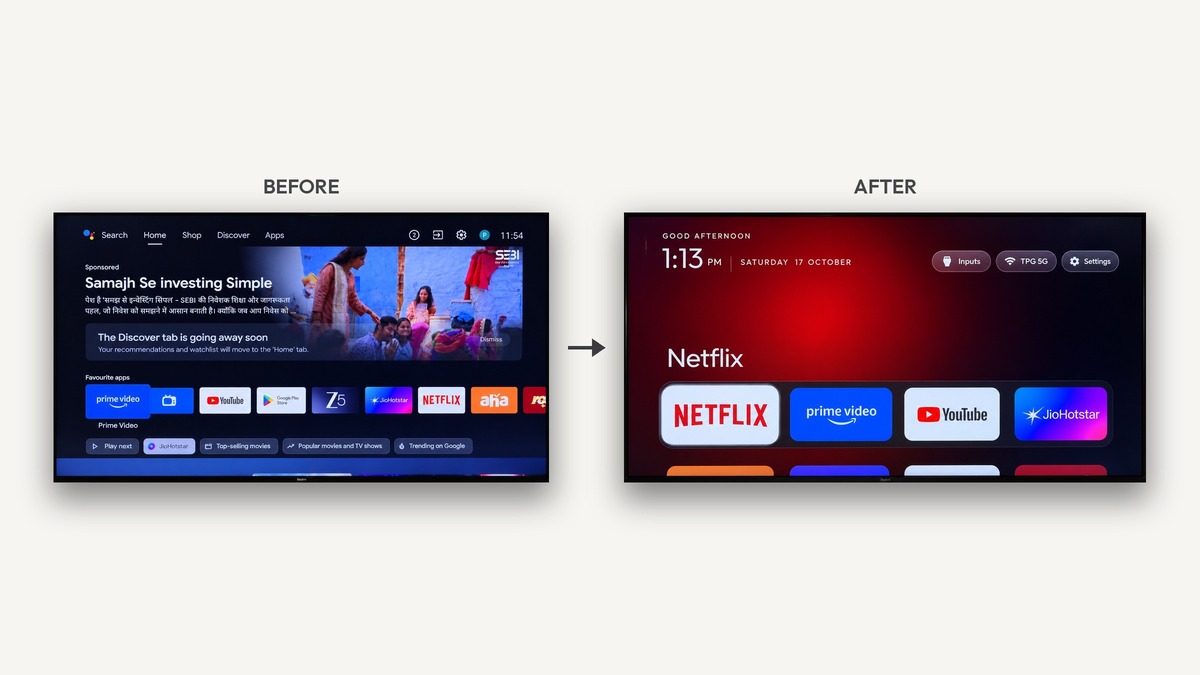
Smart television interfaces have become increasingly bloated with aggressive advertisements, sponsored carousel banners, and manufacturer telemetry. The open-source community has responded with Clean Your TV, a revolutionary toolkit designed to reclaim hardware performance without requiring root access.
According to development documentation from CleanYourTV, this lightweight project enables users to strip background bloatware across Android TV and Google TV devices over local Wi-Fi networks using simple wireless debugging commands.
| Metric / Feature | Stock Google TV Interface | Clean Your TV Environment | Performance Impact & Benefit |
|---|---|---|---|
| Home Screen Advertisements | Auto-playing video ads & sponsored banners | Zero ads (Clean application grid only) | Eliminates video ad bandwidth & clutter |
| Idle RAM Overhead | 850 MB – 1,300 MB background usage | Under 90 MB operating memory | Frees up over 80% system memory |
| Navigation Input Latency | 450ms – 1,200ms remote response lag | Sub-16ms instantaneous frame pacing | Silky smooth 60 FPS remote scrolling |
| Launcher Package Size | 48 MB + volatile cache partitions | 532 KB microscopic native footprint | Negligible onboard flash storage draw |
| Deployment Protocol | Locked manufacturer system defaults | Wireless ADB over standard local Wi-Fi | No USB cables, root, or bootloader unlock |
| System Reversibility | Difficult to revert without firmware reset | Single-line terminal command restore | Zero risk of bricking system partitions |
This structured matrix highlights the transformative performance improvements achieved when applying Clean Your TV to modern television hardware. Eliminating intrusive background services drastically reduces idle system memory overhead while restoring immediate remote control responsiveness across everyday streaming applications.
Table of Contents
Why Clean Your TV Is Essential for Modern Smart Displays
Modern consumer smart televisions frequently prioritize advertising monetization over responsive navigation performance. Deploying Clean Your TV addresses this systemic industry issue by severing telemetry connections, disabling intrusive sponsored recommendations, and establishing an ultra-minimalist home screen experience.
Over recent years, standard Google TV and Android TV home screens have transformed into aggressive digital billboards. Devices frequently allocate gigabytes of system storage and hundreds of megabytes of working memory solely to render auto-playing video trailers.
Budget streaming devices and smart televisions with limited quad-core processors suffer severe performance degradation under these background loads. Navigating basic input menus often triggers frustrating remote lag, dropped frame rates, and frequent application memory crashes during active media playback.
Manufacturer customizations from brands like Xiaomi, TCL, and Hisense compound this problem by bundling proprietary analytics services and regional content aggregators. These persistent background daemons continuously monitor viewing habits, harvesting telemetry data while competing for constrained onboard system resources.
Homelab administrators and privacy-focused enthusiasts have turned to the open-source project to reclaim complete authority over their living room hardware. By replacing commercial interfaces with an elegant open-source launcher, users restore hardware performance without purchasing expensive third-party streaming equipment.
Similar to optimization techniques explored in our breakdown of PC emulation on Android, eliminating extraneous background tasks yields dramatic improvements across constrained mobile silicon architectures.
How Clean Your TV Operates Without Root Access
The foundational engineering philosophy behind Clean Your TV centers on non-destructive wireless modification. Rather than demanding complex bootloader unlocking or risky root permissions, the tool communicates exclusively through standard Android Debug Bridge protocols over local home Wi-Fi.
Users simply enable developer options on their television and toggle the standard network debugging switch within system settings. The computer or mobile device running the utility then pairs wirelessly, executing verified management commands directly across the local subnetwork.
Crucially, the tool utilizes user-level package management commands rather than executing permanent system partition deletions. By invoking standard user disable flags, background packages are rendered inert without deleting underlying read-only system files from internal flash storage.
This architectural approach guarantees that essential firmware recovery partitions remain completely pristine throughout the debloating process. Should the user ever decide to revert their television to factory conditions, a straightforward one-line command instantly reenables every dormant manufacturer package.
The safety profile inherent to the debloating utility makes it exceptionally accessible to mainstream television owners seeking cleaner digital environments. Removing the dread of permanent device bricking encourages wider adoption among privacy advocates and performance enthusiasts alike.
Network-based hardware management mirrors the administrative simplicity achieved when managing self-hosted infrastructure, as detailed in our guide covering Snapdragon 8 Elite architecture across performance-driven computing ecosystems.
The tvOS-Inspired Launcher Experience
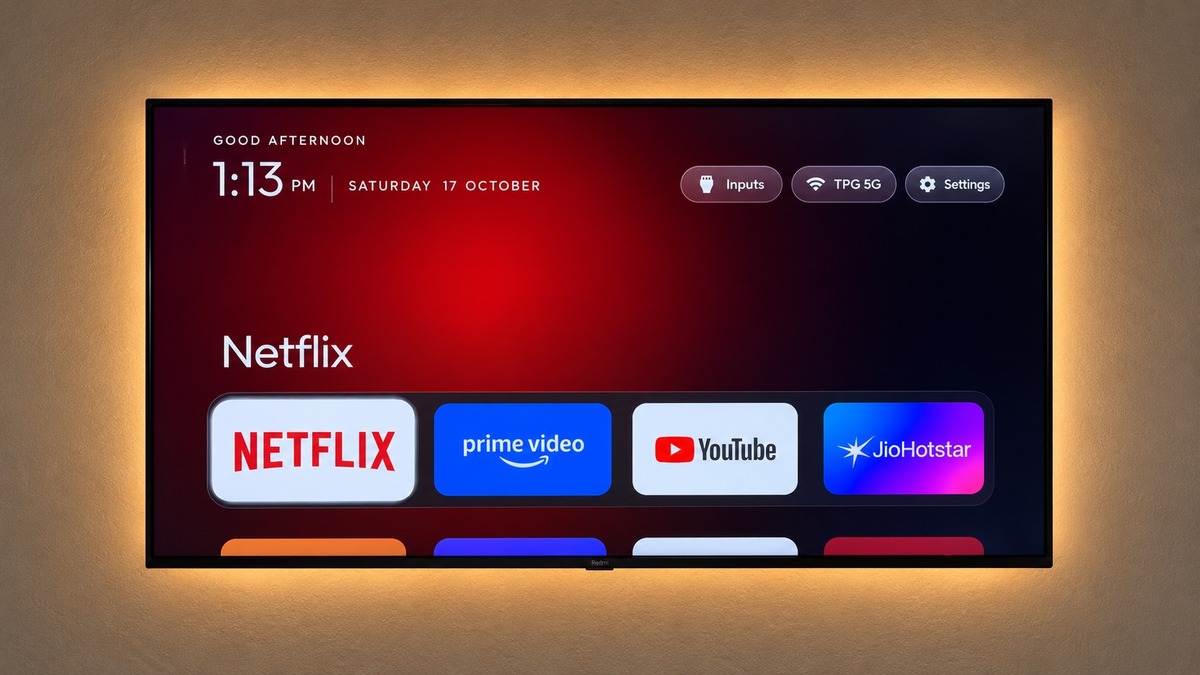
At the visual core of Clean Your TV is an impeccably crafted native launcher inspired by modern tvOS design language. Weighing a microscopic five-hundred-and-thirty-two kilobytes, the application provides an instantaneous, fluid alternative to bloated stock operating system home screens.
The primary dashboard presents a customizable grid displaying only your installed applications, arranged without disruptive advertising rows or unsolicited algorithmic recommendations. Focused app tiles deliver subtle dimensional scaling effects, providing tactile visual feedback as you navigate using standard remote directional keys.
A dedicated application library categorizes streaming services, system utilities, and gaming platforms, keeping your frequently used media accessible within two clicks. Users can hide unused utility packages completely, maintaining a clean visual aesthetic customized strictly to household entertainment preferences.
The launcher also incorporates an integrated inputs panel, allowing effortless switching between connected HDMI consoles, set-top boxes, and external audio receivers. An elegant ambient clock screensaver activates during idle intervals, preventing television panel burn-in without generating background network traffic.
By prioritizing lightweight native rendering pipelines, the open-source toolkit guarantees instantaneous six-frames-per-second remote navigation. Even modest budget televisions respond with tactile precision, eliminating the sluggish lag that traditionally plagues factory smart television interfaces.
Fluid input latency is essential for modern interactive entertainment, matching the responsiveness standards emphasized in our hardware coverage of the AMD Ryzen 7 9800X3D revealed desktop processor launch.
Hardware Benchmarks: Memory Overhead & Performance Gains
Real-world testing demonstrates that deploying Clean Your TV yields transformative improvements in measurable hardware performance. On entry-level streaming hardware equipped with limited random-access memory, idle memory consumption drops from over nine hundred megabytes down to eighty megabytes.
This substantial memory headroom prevents aggressive background task termination when switching between resource-intensive media players like Kodi and Plex. Stream buffering issues decrease substantially because the network interface is no longer saturated by persistent manufacturer telemetry and ad synchronization.
Boot times from full cold restarts improve dramatically across supported hardware profiles, often shaving fifteen to thirty seconds off initialization cycles. The processor cores remain idle until requested, significantly lowering device operating temperatures and prolonging the functional lifespan of internal motherboard components.
Furthermore, eliminating continuous ad carousel requests eliminates unnecessary background internet bandwidth consumption across your home network. Homes operating under metered broadband plans or congested wireless environments benefit immediately from the reduction in unrequested promotional video streaming traffic.
Hardware efficiency gains directly enhance long-term device usability, mirroring the thermal optimizations explored in our deep-dive into the Apple M4 Mac mini redesign and its compact unified architecture.
Documented performance benchmarks confirm that Clean Your TV successfully revitalizes aging smart television hardware. Rather than replacing sluggish displays with costly external streaming hardware, users can restore flagship-tier fluidity through intelligent software optimization.
The following technical overview outlines the extensive hardware compatibility matrix and verified package debloating profiles established by Clean Your TV. Extensive community testing guarantees reliable performance across dozens of international smart television brands and streaming architectures.
| Television Brand / Hardware Platform | Supported Operating System | Targeted Bloatware Daemons | Safe Reversal Method |
|---|---|---|---|
| Xiaomi / Mi TV / Redmi TV | Android TV 9.0 – 12.0 | com.miui.tv.analytics, com.mitv.tvhome | One-line command via debloat_haunty.txt |
| Sony Bravia Series | Google TV (Android 10 – 14) | com.sony.dtv.braviasync, ad carousels | Default user package restore script |
| TCL Smart Televisions | Android TV & Google TV | com.tcl.partnercustomizer, ad rows | Automated companion restore module |
| Chromecast with Google TV | Google TV (4K & HD Models) | com.google.android.apps.tv.launcherx | Wireless ADB user restore command |
| Philips Android Televisions | Android TV 10.0 – 12.0 | TPV background analytics & content rows | Network debugging rollback routine |
| Hisense Android TV Displays | Android TV (Excluding VIDAA OS) | com.hisense.tv.analytics, promo bars | Automated shell restore execution |
Selecting the appropriate profile ensures that brand-specific analytics daemons are safely disabled while preserving vital system display audio settings. The modular nature of Clean Your TV allows personalized adjustments tailored to individual streaming setups and peripheral hardware configurations.
Step-by-Step Wireless Setup Guide
Executing the debloating process with Clean Your TV requires only a few minutes and minimal technical preparation. Users can conduct the entire configuration using a laptop command line, an automated script, or a community-developed companion mobile application.
To begin, navigate into your television settings menu, open the device information screen, and click the build number seven times repeatedly. This action unlocks the hidden developer options submenu, where you simply toggle the network debugging switch to active.
Next, note your television local IP address from network connection properties, open a terminal on your computer, and connect Clean Your TV via wireless debugging. Once authenticated on-screen, run the provided automated debloat script or execute the tailored package list for your specific brand.
The script sequentially disables known advertising providers, background telemetry trackers, and default launcher packages while installing the lightweight alternative home screen. Within sixty seconds, pressing the home button on your remote controller reveals the pristine, ad-free television dashboard.
Maintaining your optimized setup through future system updates remains effortless thanks to the resilient architecture of the debloating utility. If a major firmware upgrade occasionally reenables default packages, running the automated script once more restores your minimalist configuration immediately.
Streamlined deployment workflows lower technical barriers for everyday users, reflecting the software distribution standards analyzed in our analysis of the GTA 6 gameplay details officially revealed milestone.
Conclusion: Reclaiming Living Room Autonomy
In an era where consumer electronics increasingly prioritize invasive monetization over user experience, Clean Your TV stands as a triumphant community achievement. It empowers television owners to reclaim their hardware, eliminate intrusive advertising, and enjoy lightning-fast media navigation.
By leveraging safe wireless debugging protocols, the project provides complete reversibility alongside uncompromising system stability. Whether you operate an entry-level streaming dongle or a premium flagship television, stripping background bloatware fundamentally transforms your daily home entertainment experience.
Embracing open-source optimization tools like Clean Your TV demonstrates that consumer hardware can thrive without corporate telemetry intrusion. Download the project today, eliminate commercial clutter, and rediscover how delightful modern smart television displays can truly be.
