


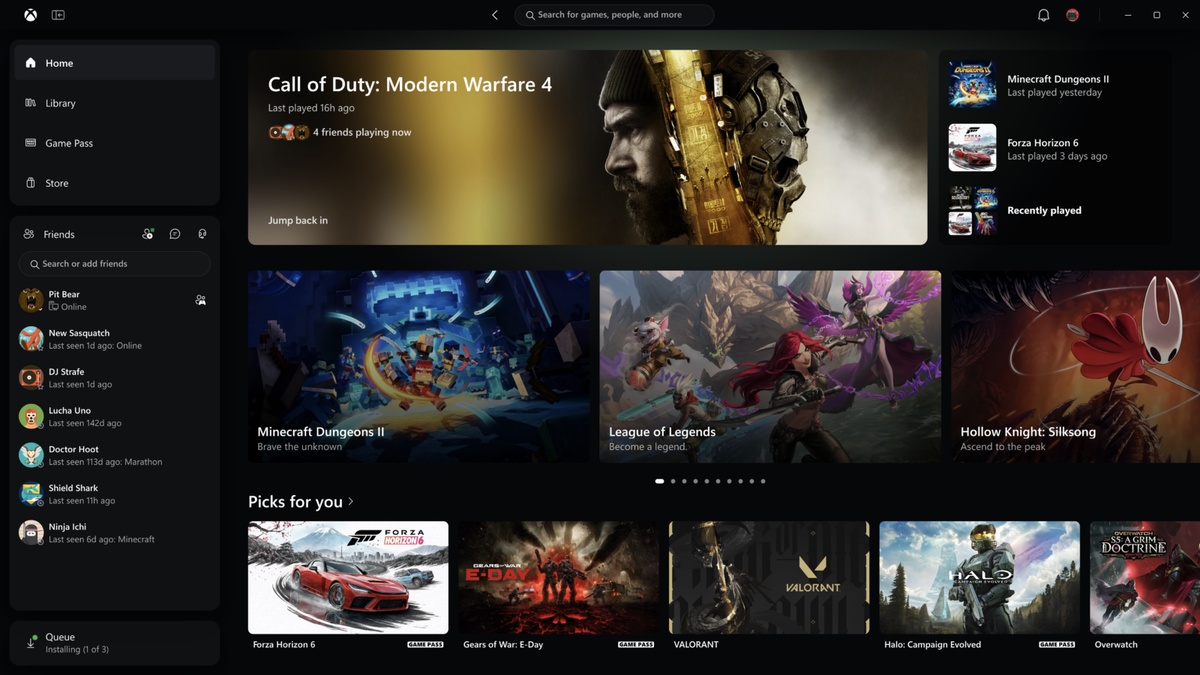
Microsoft has officially deployed the major Xbox Experience Update across Windows, web browsers, and cloud streaming platforms, delivering long-requested architectural optimizations that slash application launch times by up to 60 percent for registered gaming participants.
Starting today for Xbox Insiders before rolling out universally, this Xbox Experience Update modernizes digital game discovery, unifies cross-platform library management, and rebuilds social connectivity as confirmed via official dispatches on Xbox Wire and The Verge.
| Architecture Metric | Legacy Xbox Client | New Xbox Experience Update | Measured Advantage | Target Platforms |
|---|---|---|---|---|
| Cold Application Launch | 8.5 to 12.0 seconds boot | 3.4 to 4.8 seconds boot | Up to 60% faster launch | Windows 11 / 10 PCs |
| Store & Game Pass Hubs | Sequential asset loading | Aggressive UI pre-caching | Up to 50% faster navigation | PC App & Web Browser |
| Sub-Window Dialogs | Heavy webview rendering | Lightweight native trees | Up to 65% faster popups | Windows PC Ecosystem |
| Social & Party Chat Access | Fragmented overlay views | Direct main navigation dock | Instant zero-lag party chat | PC, Web, Smart TVs |
| Cloud Streaming Library | Dispersed browser hubs | Unified Cloud Library tab | Consolidated owned & pass games | play.xbox.com & VR |
| Accessibility Display Modes | OS system contrast only | 5 native contrast themes | Enhanced visual clarity | PC, Web, Living Room |
Table of Contents
1. Native Windows Optimization: React Native Architecture Delivers 60% Faster Boot Times
At the technical core of the Xbox Experience Update lies a comprehensive overhaul of client-side application execution, directly attacking long-standing player complaints regarding sluggish cold boots, bloated background memory consumption, and slow navigation across Windows hardware.
Internal testing data published by Microsoft reveals that the refreshed desktop application now initializes up to 60 percent faster, stripping away legacy overhead in favor of optimized modern UI pipelines built for modern gaming rigs.
Everyday navigation sees equally dramatic speedups, with high-traffic destinations like the Home dashboard, Game Pass discovery hub, and Microsoft Store catalog loading up to 50 percent faster during intense multitasking sessions on Windows desktops.
Secondary sub-windows and overlay dialogs also benefit from the Xbox Experience Update, opening up to 65 percent faster to ensure controller settings, download queues, and installation paths appear almost instantaneously without micro-stuttering.
These massive speed increases ensure that gamers pairing high-performance processors like the AMD Ryzen 7 9800X3D with cutting-edge GPUs spend minimal time waiting on client software and jump straight into gameplay.
2. Streamlined Library Architecture: Dynamic Filtering, Local Storage & Add-on Management
Beyond pure runtime performance gains, the Xbox Experience Update delivers an entirely reimagined Library view that completely reorganizes how PC players inspect, curate, and launch their personal digital collections and Game Pass subscriptions.
The redesigned interface introduces intuitive multi-tier sorting options alongside advanced dynamic filters, empowering users to slice vast digital libraries by installation status, storage drive targets, genre definitions, and multi-generational hardware enhancements.
Installed games now feature prominent individual status badges alongside streamlined management flyouts, making it effortless to track background update progress, verify file integrity, and launch titles directly from clean, modern cards.
Furthermore, DLC and add-on discoverability receives major attention in the Xbox Experience Update, allowing players to view owned expansions, Season Pass season tickets, and cosmetic bundles directly within the primary library view without browsing separate store storefronts.
This streamlined organizational architecture significantly reduces cognitive friction for power users managing multi-terabyte NVMe libraries containing dozens of concurrent installs across fragmented internal and external high-speed storage arrays.
3. Unified Social Integration: Instant Multi-Chat, Friend Presence & Voice Parties
Social architecture undergoes a massive paradigm shift in the Xbox Experience Update, embedding friends lists, multi-platform party chats, and player direct messages directly into the primary top-level app navigation rather than burying them behind secondary overlay tabs.
Gamers can now monitor real-time friend presence, track ongoing multiplayer matches, and send rapid party invites in a single click, bridging the gap between desktop gaming and cross-network console lobbies.
Voice chat subsystems have been streamlined to establish instant, low-latency audio channels, enabling smooth coordination during competitive cooperative sessions without forcing players to switch focus to third-party communication utilities or secondary windows.
By centralizing communications, this overhauled architecture creates a cohesive community ecosystem where inviting companions, sharing achievements, and coordinating cross-play raids feels organic, immediate, and fully integrated with the native desktop operating environment.
This frictionless social layer complements modern workstation setups, letting users transitioning from systems like the Apple M4 Mac mini experience genuine console-grade party management natively inside Windows 11.
4. Re-Engineered Universal Search: Instant Cross-Catalog Indexing on PC, Web & Living Room
Searching across the vast Xbox ecosystem has traditionally required navigating multiple siloed menus, but the Xbox Experience Update introduces a unified universal search architecture that indexes every gaming dimension from a single consolidated search field.
Typing a simple query now queries installed local PC software, the entire cloud gaming library, active Microsoft Store catalogs, and the global Xbox gamer network simultaneously with real-time predictive auto-completion.
Players can locate specific game add-ons, downloadable soundtracks, community creators, and friends simultaneously, eliminating frustrating context switches and reducing the time required to track down obscure franchise installments or legacy catalog entries.
| Platform Surface | Access Requirements | Key Architectural Upgrades | Supported Input Methods | Rollout Availability |
|---|---|---|---|---|
| Xbox PC App (Insider) | Free (Windows Insider Hub) | 60% faster boot, rebuilt search, unified library | Xbox Controller, Keyboard & Mouse | Available immediately for testing |
| Xbox PC App (General Public) | Free (Windows 11 / 10) | Lightweight native client, integrated party chat | Xbox Wireless Controller, KBM | Rolling out in upcoming weeks |
| Xbox Cloud Gaming (Web) | Game Pass Ultimate or F2P | Consolidated Cloud Library, Desktop Mode | Direct Touch, Gamepad, Mouse & Keys | Live today at play.xbox.com |
| Smart TVs (Samsung, Fire TV) | Xbox Cloud App + Controller | Living room navigation, quick game resume | Bluetooth & Xbox Wireless Gamepads | Staged November deployment |
| VR Headsets (Meta Quest) | Xbox Cloud App (Horizon OS) | Spatial virtual display, refreshed menu layouts | Touch Plus, Xbox Bluetooth Controller | Available via Meta Quest Store |
The algorithmic backend behind this Xbox Experience Update capability utilizes intelligent fuzzy matching, prioritizing locally installed executable binaries before querying remote cloud endpoints to return lightning-fast, highly contextual search results.
This unified discovery mechanism sets a new benchmark for PC storefront navigation, outperforming sluggish competitor launchers and demonstrating Microsoft’s renewed commitment to premier Windows gaming convenience and responsive system software design.
5. Cloud Ecosystem Expansion: Responsive Web UI, High-Contrast Modes & Smart TV Integration
While native desktop applications receive substantial boosts, the Xbox Experience Update simultaneously transforms cloud gaming by expanding the refreshed web interface at play.xbox.com to universal audiences across browsers, Smart TVs, and VR headsets.
A dedicated Cloud Library tab consolidates every streamable title whether owned directly through digital purchases or accessed via subscriptions, building upon innovative Xbox Cloud Gaming architectures.
Browser players on larger monitors can take full advantage of an expansive Desktop Mode, which optimizes screen real estate with rich artwork banners, dynamic carousels, and responsive multi-column layouts built specifically for desktop displays.
Visual accessibility takes center stage in the Xbox Experience Update, introducing dark mode, light mode, and five distinct high-contrast display palettes tailored to accommodate diverse visual needs, color preferences, and low-light ambient conditions.
As operating environments evolve and legacy platforms face obsolescence, such as when Nvidia ends Windows 10 support, these agile web and cloud improvements ensure seamless gaming continuity across any connected display.
Frequently Asked Questions
What performance improvements does the Xbox Experience Update bring to PC?
The Xbox Experience Update delivers up to 60 percent faster app launch times, 50 percent faster page loading for Home, Store, and Game Pass tabs, and 65 percent faster in-app sub-window rendering.
How can gamers access the new Xbox PC app features today?
Members of the Xbox Insider Program can access the Xbox Experience Update immediately via the Xbox Insider Hub on Windows 10 and Windows 11 PCs, prior to widespread general release.
What changes are introduced to Xbox Cloud Gaming on the web?
Under the Xbox Experience Update, play.xbox.com introduces a dedicated Cloud Library tab, an expansive Desktop Mode for large monitors, and five brand-new high-contrast accessibility color profiles.
Are social features and party chats easier to access in the new app?
Yes, the Xbox Experience Update moves friends lists, voice party management, and active game invites directly into the primary navigation bar, eliminating the need to launch secondary overlay windows.
Does the updated Xbox experience support Smart TVs and VR headsets?
Yes, Microsoft is actively rolling out the refreshed Xbox Experience Update interface across supported Samsung Smart TVs, Amazon Fire TV sticks, and Meta Quest virtual reality headsets.
Final Verdict: Microsoft Unifies Xbox Gaming Across Windows, Web, and Cloud
The comprehensive Xbox Experience Update represents an essential, highly calculated leap forward for Microsoft’s cross-platform gaming vision, rectifying long-standing software bloat and delivering the snappy, responsive utility that desktop enthusiasts have persistently demanded.
By pairing 60 percent faster application launch speeds with consolidated library organization, native social docks, and versatile browser cloud interfaces, this unified deployment establishes a harmonious ecosystem uniting PC, console, web, and television screens.
As the rollout expands from Xbox Insiders to global audiences over the coming weeks, the Xbox Experience Update firmly reasserts Xbox as a premier, performant gaming hub ready to dominate next-generation interactive entertainment.
