


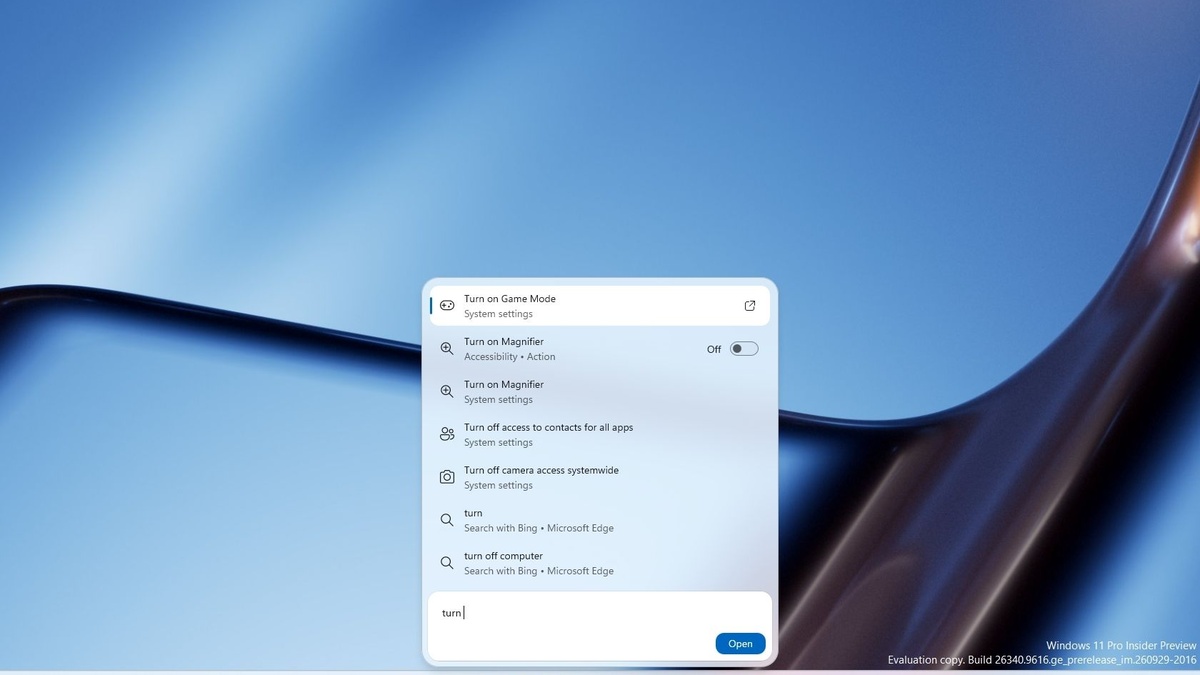
Microsoft leadership has officially confirmed that the newly overhauled Windows 11 Taskbar Search will receive comprehensive native support for vertical taskbar docks, resolving a prominent design limitation on modern widescreen desktop displays.
Following direct inquiries from the enthusiast community regarding awkward flyout placement along the bottom perimeter of the desktop, Microsoft Windows design executives verified that specialized UI adaptations are currently under active internal development.
| Taskbar Orientation | Current Search Behavior | Upcoming Update Anchor | Ergonomic Workflow Rating |
|---|---|---|---|
| Bottom (Default) | Centered or left-docked bottom flyout | Retained standard bottom flyout | Optimized for standard 16:9 displays |
| Left Vertical Rail | Awkward floating bottom canvas | Direct adjacent left-rail flyout | Superior for ultrawide productivity |
| Right Vertical Rail | Awkward floating bottom canvas | Direct adjacent right-rail flyout | Ideal for secondary monitor arrays |
| Top Display Edge | Floating lower screen window | Top-docked downward dropdown | Favored by legacy macOS switchers |
Microsoft Confirms Windows 11 Taskbar Search Layout Upgrades
Regarding Windows 11 Taskbar Search have long preferred docking their primary navigation bars vertically along the side of the screen to preserve precious vertical pixel real estate for code editors and timeline applications.
According to direct reporting from Windows Central, the latest desktop search experience shipped with an annoying visual constraint that anchored the flyout panel exclusively to the bottom screen boundary regardless of taskbar orientation.
Under Windows 11 Taskbar Search taskbar on the left, right, or top edge of the display, opening the search dialog caused the canvas to float awkwardly near the bottom with unnatural spacing.
Analyzing Windows 11 Taskbar Search when Abhijith M B, Managing Editor of Windows Latest, queried Windows leadership on social media regarding upcoming ergonomic optimizations for non-standard display alignments.
Regarding Windows 11 Taskbar Search Design and Research for Windows and Devices, promptly escalated the inquiry to Diego Baca, Vice President of Design at Windows, who confirmed ongoing engineering efforts.
Confirming Windows 11 Taskbar Search Windows software team is actively developing dedicated interface anchors for vertical taskbars, advising power users and system administrators to stay tuned for upcoming flighted test builds.
Decoupling Search Canvas Coordinates From Screen Bottoms
Within Windows 11 Taskbar Search the current awkward presentation stems from legacy XAML and WinUI coordinate bindings that assumed the taskbar would permanently occupy the bottom viewport boundary.
Originating Windows 11 Taskbar Search Windows 11 shell, engineering teams removed registry toggles and built-in settings for side docking, simplifying shell layout logic around a rigid horizontal center-aligned model.
Advancing Windows 11 Taskbar Search to restore flexible taskbar positioning across top and side borders, yet individual flyout modules remained hardcoded to calculate opening offsets relative to bottom screen pixels.
Deploying Windows 11 Taskbar Search Windows shell developers to dynamically query the active display edge, calculate available viewport bounding boxes, and transform flyout coordinate matrices in real time.
Refining Windows 11 Taskbar Search, the updated search experience will deploy adjacent to the taskbar pill regardless of whether users dock their system tray on the left, right, or upper display border.
Ultimately, Windows 11 Taskbar Search visual disconnects and provides a seamless transitional animation matching the fluid acrylic design principles established across modern Windows desktop applications.
Why Vertical Taskbar Alignment Breaks Legacy Flyout Anchors
Behind Windows 11 Taskbar Search constraints because the available horizontal width is narrow while vertical space extends across the entire display matrix from top to bottom.
Through Windows 11 Taskbar Search on a vertical taskbar, opening a wide standard flyout panel along the bottom forces eyes to jump diagonally across the screen, breaking focused ergonomic workflows.
Across Windows 11 Taskbar Search DPI scaling factors often experience clipping anomalies when flyout windows attempt to render across virtual desktop coordinate thresholds without valid parent anchoring.
As enterprise users migrate hardware ahead of the impending end of Windows 10 support, demands for customizable desktop layouts and consistent multi-monitor shell behavior have surged substantially.
Within Windows 11 Taskbar Search docking search against a vertical rail preserves rapid optical scan paths, allowing keyboard queries to display instantaneous categorized results directly adjacent to the input cursor.
Advancing Windows 11 Taskbar Search a vital quality-of-life milestone for demanding workstations running high-density displays and complex multi-tasking window management suites.
Windows 11 Taskbar Search Architecture and Shell Integration
The Windows 11 Taskbar Search into Windows 11 represents a complete departure from the slow web-heavy webview containers that plagued earlier operating system releases.
Under the hood, modern search combines native WinUI 3 visual composition with low-latency SQLite indexing and Windows Search Service integration to surface local files and system utilities instantaneously.
In recent preview builds, Microsoft introduced inline administrative actions, empowering users to toggle system settings, launch PowerShell scripts, and inspect network adapters directly within the search canvas.
Delivering inline actions adjacent to a vertical taskbar requires responsive card reflow, ensuring administrative buttons and toggle switches remain touch-friendly and easily clickable without obscuring active work windows.
Engineers are testing adaptive layout templates that dynamically reshape search results into compact vertical cards when docked against a side rail, preserving contextual screen visibility.
This responsive design philosophy ensures high information density without cluttering the screen or demanding excessive cursor travel across sprawling ultra-wide monitors.

| Engineering Feature | Legacy Windows 10 Search | Initial Windows 11 Search | Overhauled 2026 Search Engine |
|---|---|---|---|
| UI Framework | Web-based Edge WebView container | Early WinUI XAML implementation | High-performance native WinUI 3 |
| Docking Anchors | Bottom taskbar exclusive | Hardcoded bottom screen offsets | Dynamic multi-edge viewport queries |
| Inline Actions | Limited link redirects | Basic file preview cards | Direct setting toggles and PowerShell |
| Idle Memory Footprint | 120MB to 250MB active RAM | 75MB to 110MB active RAM | Sub-45MB lightweight background host |
| Multi-DPI Scaling | Prone to blurry bitmap assets | Occasional window clipping | Hardware-accelerated vector composition |
Modernizing Inline Actions and Copilot Execution Modalities
Beyond local file indexing, Microsoft continues integrating optional generative artificial intelligence and semantic search routines directly into the desktop navigation framework.
Power users utilizing modern processors like the AMD Ryzen 7 9800X3D benefit from accelerated multi-threaded indexing that parses enterprise document repositories and source repositories in milliseconds.
When Copilot features are enabled, users can invoke natural language queries to modify complex system policies, configure firewall rules, or query device hardware configurations directly from the taskbar.
However, Microsoft has explicitly promised that deep AI integration will remain strictly optional, allowing IT administrators and performance purists to maintain a lean, distraction-free search experience.
Preserving a distraction-free mode is critical for enterprise fleets where privacy regulations and strict corporate policies prohibit cloud telemetry and automated query logging.
Optimizing these modular capabilities for vertical dock orientations guarantees that professional users retain full utility regardless of their customized desktop workspace configuration.
Multi-Monitor Workflows and Vertical Taskbar Performance Dynamics
Modern workstation setups frequently pair high-refresh gaming displays with secondary vertical monitors dedicated to code compilation, documentation, and chat communications.
In such asymmetric display arrays, placing the taskbar on the outer vertical edge creates an intuitive peripheral hub that unifies multi-panel navigation.
When search operations are triggered across disparate monitor scaling ratios, GPU composition engines must seamlessly re-rasterize XAML assets without introducing stutter or frame drops.
Recent shell updates demonstrate notable memory efficiency improvements, trimming background search host overhead to under 45 megabytes of system RAM during idle desktop states.
Compact workstations and low-power hardware, comparable to the redesigned Apple M4 Mac mini, benefit immensely from optimized shell resource management during sustained multi-application execution.
Ensuring fluid 120Hz animation delivery when expanding vertical flyout panels cements Windows 11 as a polished, responsive desktop environment for demanding enthusiasts.
Windows 11 Taskbar Search Registry Workarounds and Tool Limits
Prior to Microsoft’s official commitment, power users frequently resorted to third-party open-source shell modifications like StartAllBack and ExplorerPatcher to reposition taskbars and customize flyout behavior.
While these third-party utilities successfully decoupled taskbar elements from the bottom display edge, major Windows cumulative updates frequently broke custom DLL hooks, causing stability crashes and explorer restarts.
Furthermore, enterprise IT administrators routinely prohibit third-party shell injectors on managed workstations due to security compliance policies, administrative privileges, and strict code signing requirements.
Native operating system support eliminates reliance on fragile runtime injection libraries, ensuring that vertical search anchors remain durable and completely reliable across monthly patch Tuesday updates.
Operating within Microsoft’s official WinUI composition stack also guarantees full compatibility with system-level security protections, including virtualization-based security and kernel memory integrity.
By delivering clean native integration, Microsoft restores workflow customization without requiring users to sacrifice system reliability, diagnostic telemetry compliance, or long-term operating system stability.
Insider Preview Deployment Schedule and Feature Delivery
Microsoft operates an agile flighting cadence through the Windows Insider Program, distributing early engineering builds across Canary, Dev, and Beta preview channels.
Design adjustments confirmed by executive leadership typically debut in Canary channel flights within several weeks following public confirmation, subject to telemetry validation and crash metrics.
Once early build testers verify stability and confirm smooth animation handoff on vertical displays, feature packages transition to Dev and Beta rings for broader validation across diverse hardware.
General availability for consumer and enterprise production rings will likely arrive through an upcoming Windows 11 cumulative update or Moment feature enablement package later this year.
Enterprise fleet managers can preview these shell enhancements ahead of time by enabling optional diagnostic telemetry and participating in release preview validation rings.
This phased rollout model safeguards enterprise operational continuity while allowing enthusiastic early adopters to refine the feature through targeted telemetry and feedback hub submissions.
Definitive Architectural Verdict on Windows 11 Desktop Ergonomics
Microsoft’s public commitment to refine search alignment across vertical taskbars reflects a welcome willingness to listen to enthusiast feedback and support diverse productivity setups.
While bottom-docked taskbars remain the default for casual laptop users, power professionals and ultrawide monitor owners rely on vertical flexibility to maximize screen productivity.
By eliminating visual quirks and delivering seamless anchor geometry, Windows 11 continues maturing into an adaptable, ergonomically sound desktop operating system for serious creators.
Frequently Asked Questions
Will the new Windows 11 Search officially support vertical taskbars?
Yes, Microsoft Vice President of Design Diego Baca confirmed that development teams are actively engineering native adaptations for vertical taskbar docks in upcoming Windows 11 preview releases.
Why does the current Windows 11 Search look awkward on vertical taskbars?
Currently, triggering search while using a side or top taskbar causes the flyout window to float awkwardly near the bottom perimeter with unnatural spatial padding.
How will Microsoft anchor the Search flyout on side taskbars?
The upcoming update will automatically query the active taskbar edge and deploy the search flyout immediately adjacent to the navigation pill with fluid transitional animations.
Does the overhauled Windows 11 Search support inline PC controls?
Yes, upcoming search builds will support inline system setting adjustments, allowing users to toggle Wi-Fi, manage Bluetooth devices, and launch utilities without opening the full Settings application.
When will the vertical taskbar search update be released to users?
Early test builds will arrive first in the Canary and Dev channels of the Windows Insider Program before expanding to general production rings.
