


Table of Contents
Microsoft has rolled out nostalgic Xbox boot-up options for Xbox Series X|S and Xbox One consoles, restoring the iconic startup animations from the original 2001 Xbox and Xbox 360 as part of the brand’s official twenty-fifth anniversary celebration.
Detailed in coverage from IGN, this surprise firmware delivery allows console owners to customize their startup screens with authentic historical assets celebrating a quarter century of Microsoft gaming.
| Boot Sequence Profile | Historical Generation | Visual Aesthetic & Theme | Sound Design & Audio Cues | Supported Hardware Consoles |
|---|---|---|---|---|
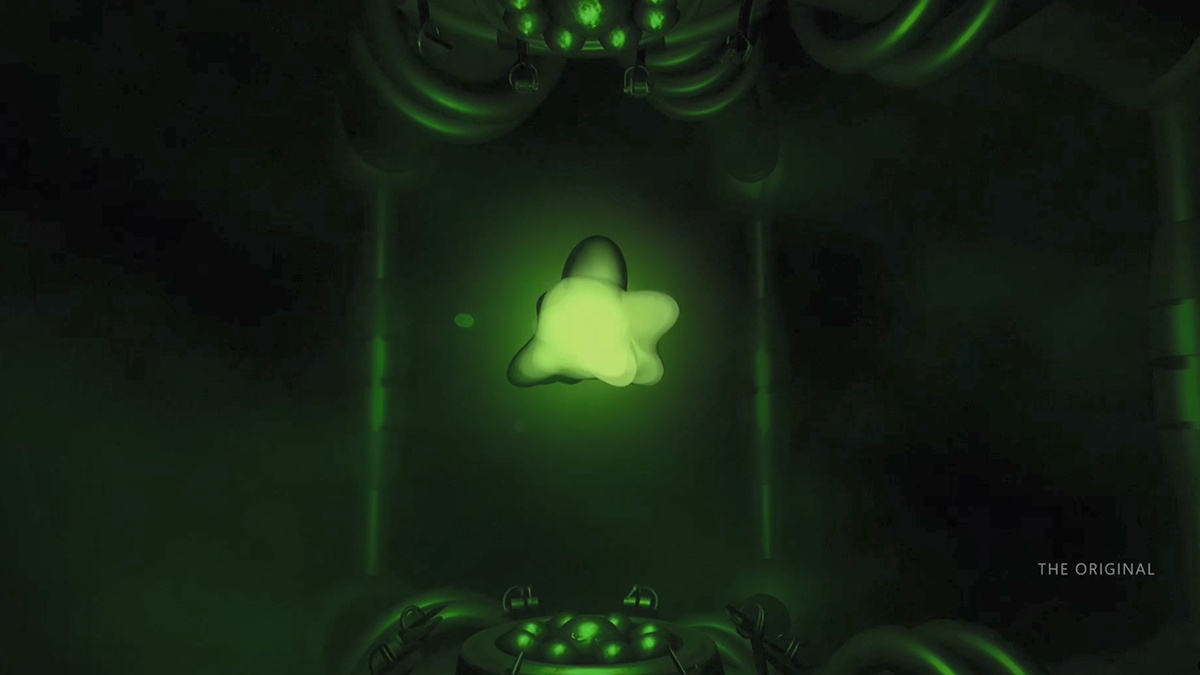
| Original Xbox Classic | 2001 Launch Firmware | Glowing Bio-Mechanical Green Plasma Core | Sub-Bass Sci-Fi Synth Hum & Stinger | Xbox Series X|S & Xbox One |
| Xbox 360 Launch Edition | 2005 Blades Dashboard | Pulsing Green Nexus Ring & Energy Ribbon | High-Frequency Chime & Swoosh | Xbox Series X|S & Xbox One |
| Xbox 360 Metro Refresh | 2010 Slim Dashboard | Minimalist Modern Nexus Sphere Burst | Crisp Digital Tone & Subtle Echo | Xbox Series X|S & Xbox One |
| Modern Series Default | 2020 Standard OS | High-Contrast Xbox Sphere & Gradient Wave | Modern Cinematic Low-Frequency Chord | Xbox Series X|S (Factory Setting) |
Nostalgic Firmware Integration: Restoring the Iconic 2001 Sci-Fi Startup
The arrival of retro Xbox boot-up options marks a meaningful celebration for longtime enthusiasts who experienced the green living room revolution when Microsoft first launched its landmark console back in late 2001.
The restored original animation captures the distinct bio-mechanical aesthetic engineered for the original console, featuring pulsing neon green plasma trapped within a metallic reactor casing before releasing the glowing three-dimensional emblem.
Unlike compressed community emulation recordings, these authentic Xbox boot-up options run natively from local console storage, delivering razor-sharp visual clarity on modern high-resolution displays without introducing noticeable boot delay.
Longtime hardware fans will appreciate how this sequence honors early engineering milestones explored in our Original Xbox hardware architecture retrospective, highlighting Microsoft’s bold transition into dedicated gaming hardware.
This native fidelity ensures that every ripple of volumetric energy and dynamic particle effect renders cleanly, providing a faithful recreation that respects historical design while leveraging modern graphical pipelines.
Dual Xbox 360 Eras: Contrasting the 2005 Blades Debut and 2010 Redesign
Alongside the original console intro, Microsoft included two distinct Xbox boot-up options honoring separate developmental phases of the venerable Xbox 360 hardware era.
The first option resurrects the legendary 2005 launch sequence, featuring swirling emerald ribbons that coalesce into the spherical nexus logo that defined the revolutionary Blades dashboard interface.
The second variant introduces the streamlined 2010 startup animation, which arrived alongside the matte black Xbox 360 S redesign and reflected the modern Metro tile visual language.
Providing both options within the modern Xbox boot-up options selector allows veteran players to tailor their personal gaming experience to whichever historical dashboard iteration holds their fondest multiplayer memories.
As observed in historical announcements documented on the official Xbox broadcast channel, preserving both phases acknowledges the massive interface transformations that shaped seventh-generation console gaming.
Audio Preservation Engineering: Re-Engineering Iconic Boot Soundtracks in Spatial Audio
A critical component of these newly integrated Xbox boot-up options centers on sound preservation, restoring iconic audio signatures that greeted gamers across previous console generations.
Audio engineers painstakingly extracted the original acoustic masters, ensuring the deep mechanical sub-bass rumble of the original console boot translates effectively to modern Dolby Atmos sound systems.
The iconic Xbox 360 orchestral chime and resonant swoosh have similarly received uncompressed digital treatment, eliminating background hiss while maintaining the bright harmonics of the 2005 source file.
Modern gaming audio processing requires substantial computational headroom, paralleling architectural innovations analyzed in our AMD processor silicon engineering breakdown regarding low-latency digital signal manipulation.
By pairing high-fidelity audio remastering with authentic visuals, these Xbox boot-up options deliver an immersive sensory throwback every time players power on their living room entertainment consoles.
Dashboard Configuration Guide: Step-by-Step Activation Across Series X|S and One
Accessing the newly introduced Xbox boot-up options requires console owners to navigate into the standard system settings menu on their Xbox Series X|S or Xbox One devices.
Users must open the Settings application, select the General tab, and proceed directly into the Personalization submenu where startup visual preferences are managed.
Within the Startup and Audio configuration screen, a dedicated Boot Animation dropdown menu allows players to preview and select between modern, classic, and 360 presets.
| Console Generation | CPU Architecture | GPU Graphics Silicon | Unified Memory Pool | Primary OS Dashboard | Cold Boot Duration |
|---|---|---|---|---|---|
| Original Xbox (2001) | Intel Mobile Pentium III (733 MHz) | Nvidia NV2A XGPU (233 MHz) | 64 MB DDR SDRAM | Sci-Fi Kernel Dashboard | ~12 Seconds |
| Xbox 360 (2005) | IBM Xenon Triple-Core (3.2 GHz) | ATI Xenos 10MB eDRAM (500 MHz) | 512 MB GDDR3 | Blades / Metro Interface | ~15 Seconds |
| Xbox One (2013) | AMD Jaguar 8-Core x86 (1.75 GHz) | AMD GCN 1.1 Compute (853 MHz) | 8 GB DDR3 + 32MB ESRAM | Windows 8 Hyper-V Core | ~45 Seconds |
| Xbox Series X (2020) | AMD Zen 2 8-Core (3.8 GHz) | AMD RDNA 2 52 CUs (1.825 GHz) | 16 GB GDDR6 | Modern Windows Xbox Shell | ~18 Seconds |
Players selecting legacy Xbox boot-up options should verify their console power mode is set to Shutdown Energy Saving mode rather than Instant-On Sleep mode.
Because sleep configurations bypass initial cold boot animations to accelerate system resume times, selecting Energy Saving mode ensures the nostalgic boot video displays upon every fresh boot.
Console owners utilizing cloud streaming hubs, discussed in our Xbox cloud streaming performance breakdown, will continue receiving standard cloud interface screens until remote virtualization supports custom boot profiles.
The 25th Anniversary Milestone: From Pentium III Origins to Project Helix Next-Gen Hardware
The rollout of commemorative Xbox boot-up options arrives as Microsoft actively reflects on its twenty-five-year gaming heritage while architecting future hardware platforms.
Alongside the anniversary firmware update, Microsoft released a special commemorative digital magazine highlighting developmental roadmaps for next-generation hardware codenamed Project Helix universal console architecture.
This hardware initiative reflects Microsoft’s expanding living room ecosystem, bridging dedicated console silicon with expansive personal computer gaming libraries across unified Windows operating environments.
Balancing nostalgic preservation through retro Xbox boot-up options with ambitious hardware roadmaps demonstrates Microsoft’s intent to honor brand legacy while preparing players for cross-platform hardware shifts.
As the gaming landscape evolves toward hybrid form factors, honoring defining milestones like the original console startup provides continuity for millions of dedicated community members.
Frequently Asked Questions
Which consoles support the new Xbox boot-up options?
The new Xbox boot-up options are officially supported across all Xbox Series X, Xbox Series S, and Xbox One console models running the latest anniversary firmware update.
How do I activate the original Xbox or 360 boot sequence?
Navigate to Settings, select General, choose Personalization, open Startup and Audio, and select your preferred animation from the Boot Animation dropdown menu.
Why is the boot animation not playing when I turn on my console?
The boot animation only plays during cold boots. If your console is set to Sleep mode, change your power configuration to Shutdown Energy Saving mode.
Do the classic Xbox boot-up options increase system startup times?
No, the animation assets are stored locally on high-speed solid-state drives and run concurrently with standard background operating system loading routines.
Are these retro boot animations permanently available?
Yes, Microsoft has integrated these nostalgic Xbox boot-up options as permanent system firmware customization options rather than temporary anniversary promotional events.
Final Verdict: Celebrating Console Heritage Through Authentic Dashboard Preservation
The introduction of authentic Xbox boot-up options represents an exemplary model of digital preservation, allowing longtime players to celebrate twenty-five years of Xbox history directly on modern hardware.
By delivering uncompressed visual assets and remastered acoustic signatures for both original and 360 eras, Microsoft has elevated a simple system update into a heartfelt tribute.
Whether setting up the nostalgic 2001 green reactor or the pulsing 2005 360 chime, these new Xbox boot-up options provide an exceptional personal touch for dedicated living room gamers.
