


Table of Contents
Independent software engineers have achieved an astonishing breakthrough by bringing unofficial Windows 7 DirectX 12 and Vulkan 1.4 driver support to Microsoft’s seventeen-year-old operating system. This milestone allows cutting-edge desktop graphics cards to function seamlessly on the vintage desktop environment.
Despite Microsoft formally abandoning extended servicing for the vintage operating system years ago, dedicated retro developers continue dismantling theoretical architectural boundaries. This ambitious driver initiative pairs low-level graphics subsystems with modern silicon to demonstrate unprecedented operating system longevity.
To help computer enthusiasts understand the massive technical evolution between legacy and modern display architectures, our hardware desk compiled a comparison matrix. The table below illustrates core driver subsystem characteristics across official releases and the new community backport.
| Display Subsystem Metric | Windows 7 Retail (2009) | Windows 10 Baseline (2015) | W7Revived Modded Driver Core |
|---|---|---|---|
| Display Driver Model | WDDM 1.1 Native | WDDM 2.0 / 2.2 Core | WDDM 2.2 Backported Runtime |
| DirectX API Capabilities | Direct3D 11.0 Standard | Direct3D 12 Feature Level 12_1 | Direct3D 12 Low-Level Execution |
| Vulkan Specification Tier | Vulkan 1.0 Initial | Vulkan 1.3 Baseline | Vulkan 1.4 Complete Conformity |
| Hardware Generation Range | GeForce GTX 200 / Radeon HD 5000 | GeForce GTX 900 / Radeon R9 300 | GeForce RTX 50 / Radeon RX 9000 |
| Ray Tracing & Upscaling | Unsupported (Raster Only) | Full DXR & Native DLSS | Experimental DXR & DLSS Runtimes |
| Memory Management Architecture | Linear Video Memory Allocations | Virtual Memory GPU Page Tables | Emulated Virtual Address Space (GPUMMU) |
Analyzing these architectural metrics demonstrates the profound engineering effort required to enable Windows 7 DirectX 12 graphics. The community initiative completely rewrites low-level driver communications, creating a viable path for enthusiast graphics workloads on mature operating systems.
Architectural Foundation: How Windows 7 DirectX 12 Revives Legacy Systems
The ongoing resilience of legacy personal computing platforms frequently surprises mainstream technology analysts who prioritize modern subscription-based ecosystems. Through this new project, Windows 7 DirectX 12 capability transforms from a theoretical fantasy into an accessible, operational reality for hardware experimenters.
First highlighted by researcher @TheBobPony on social channels, the initiative was developed by EAZY BLACK, kryptik, and VisualEhrmanntraut. According to technical reporting from Tom’s Hardware on Windows 7 GPU breakthroughs, the team achieved what engineers long deemed impossible.
When Microsoft originally released Windows 7 in October 2009, personal computers relied on monolithic driver paradigms. Modern graphic pipelines now demand Windows 7 DirectX 12 style hardware manipulation, creating substantial architectural friction when vintage software attempts to communicate with modern multi-chiplet graphics processing units.
Microsoft briefly experimented with a restricted implementation of low-level graphics for older systems during 2019 to assist select game ports. However, that historical deployment remained confined to targeted software binaries and never delivered comprehensive Windows 7 DirectX 12 hardware driver acceleration.
By contrast, this comprehensive community initiative operates directly at the device driver interface level. Enthusiasts can install modified vendor packages that register contemporary graphics silicon directly with Windows subsystem managers, exposing modern render pipelines to legacy desktop software.
Understanding the persistence of mature operating platforms requires examining how desktop software overhead affects compute performance. Just as enterprise administrators study lifecycle transitions during Nvidia ending Windows 10 driver support, enthusiasts scrutinize the lightweight resource footprint of unbloated vintage desktop installations.
WDDM 2.2 Backporting: The Technical Heart of Windows 7 DirectX 12
The primary technological foundation enabling Windows 7 DirectX 12 compatibility is the backporting of the Windows Display Driver Model version 2.2. Originally introduced by Microsoft inside the Windows 10 Creators Update in 2017, WDDM 2.2 fundamentally transformed display engine execution.
Windows 7 shipped natively with WDDM 1.1, an architecture that relied heavily on centralized kernel scheduling and coarse virtual memory management. Achieving functional Windows 7 DirectX 12 operation requires fine-grained GPU virtual memory address spaces, dynamic resource binding, and independent queue submission structures.
To bridge this immense platform gap, the development team reverse-engineered the kernel-mode driver linkages governing DirectX graphics kernel operations. By injecting modified dynamic link libraries, the software translates contemporary display requests into structures recognizable by the Windows 7 NT 6.1 kernel.
This sophisticated backport establishes virtual GPU memory mapping tables that allow Windows 7 DirectX 12 calls to bypass legacy memory constraints. Hardware commands flow directly into physical compute units, enabling asynchronous shader dispatching and multi-threaded command list execution.
Platform engineers who have explored display driver internals recognize the immense complexity of this binary translation layer. Because the underlying Windows kernel lacks native awareness of contemporary hardware schedulers, the modified driver runtime intercepts privileged calls and handles synchronization in user-space.
Through meticulous system hooking and registry reconfiguration, the runtime convinces graphics management utilities that compliant display pipelines exist. As a result, Windows 7 DirectX 12 execution proceeds without tripping catastrophic kernel bugchecks or triggering legacy fallback rendering paths.
Driver Reconstruction: Enabling Nvidia RTX 50 and AMD RX 9000 Silicon
Building functional kernel compatibility represents only half the challenge; hardware vendors must also communicate directly with modern graphics chips. The project team developed heavily modified driver packages that enable Windows 7 DirectX 12 support across Nvidia RTX 50, AMD RX 9000, and Intel Arc series.
Modern graphics processing units utilize sophisticated chiplet topologies and complex power delivery microcode that require modern firmware handshakes. Adapting these interfaces for Windows 7 DirectX 12 execution requires modifying driver INF files and restructuring kernel signature verification routines.
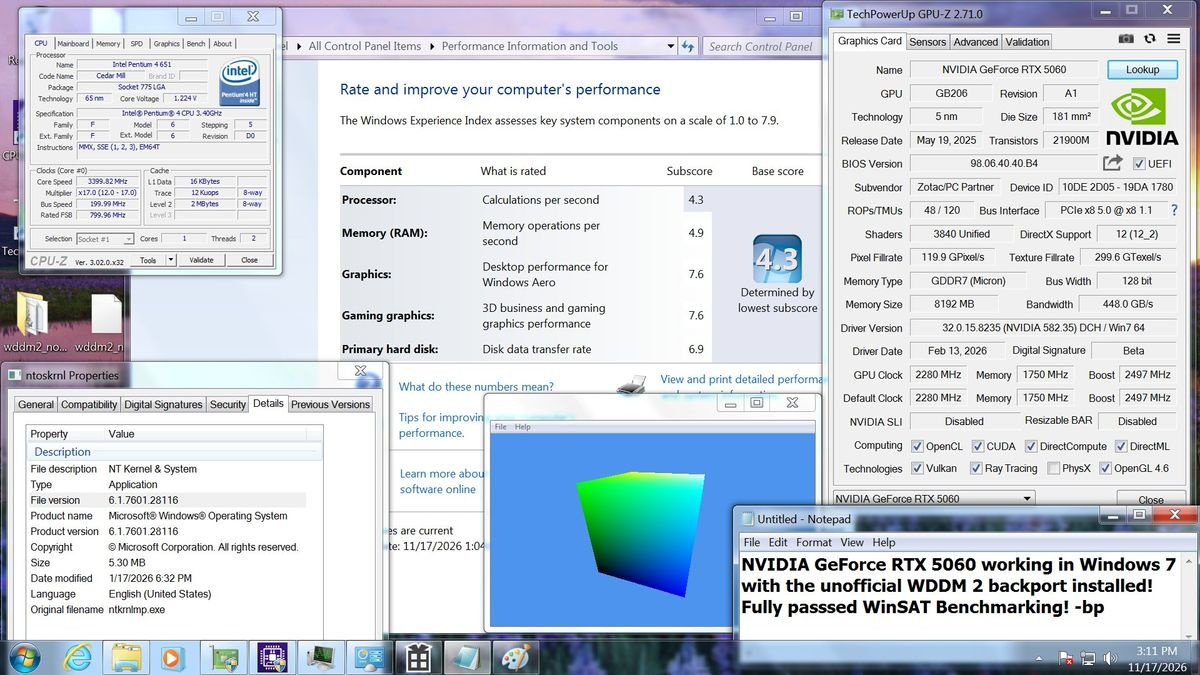
Photographic evidence and utility telemetry confirm that diagnostic software like GPU-Z correctly identifies modern graphics hardware under Windows 7. Core clock frequencies, memory bandwidth configurations, and active compute unit clusters register accurately within the legacy desktop interface.
Enthusiasts testing early releases have reported successful hardware-accelerated Ray Tracing and Deep Learning Super Sampling operations on compatible GeForce hardware. While driver stability fluctuates depending on application complexity, the fact that tensor cores engage under Windows 7 DirectX 12 represents an extraordinary engineering triumph.
Furthermore, previous-generation hardware architectures also gain significant utility from these modified drivers. Owners of Nvidia GeForce RTX 30 and 40 series cards, as well as AMD Radeon RX 6000 and 7000 series products, can operate modern hardware on vintage installations.
For retro computing purists building ultimate vintage testbeds, running cutting-edge silicon on a beloved desktop environment provides unmatched aesthetic and technical satisfaction. These driver breakthroughs prove that architectural boundaries often stem from commercial vendor choices rather than absolute hardware incompatibilities.
Vulkan 1.4 API Integration and Modern Graphics Pipeline Capabilities
Alongside proprietary Microsoft graphics APIs, the community project incorporates full compliance with the modern Vulkan 1.4 open rendering specification. Integrating Vulkan alongside Windows 7 DirectX 12 functionality delivers a versatile graphics foundation capable of launching modern cross-platform engines.
Standardized by the Khronos Group, Vulkan 1.4 brings unified timeline semaphores, dynamic rendering extensions, and standardized maintenance architectures. Alongside Windows 7 DirectX 12 routines, these modern libraries empower developers to execute bleeding-edge emulation layers and modern graphics workloads on aging desktop platforms.
The presence of robust Vulkan acceleration proves particularly vital for compatibility translation layers like DXVK and VKD3D-Proton. These translation systems complement Windows 7 DirectX 12 workflows by mapping modern graphics directives into high-performance Vulkan primitives for smooth gameplay rendering.
When coupled with Windows 7 DirectX 12 modifications, the expanded Vulkan pipeline ensures that complex shaders compile without crashing the desktop compositor. The operating system handles simultaneous rendering queues without encountering the memory leak bottlenecks that plagued earlier third-party graphics wrappers.
To clarify the extent of modern graphics support across contemporary graphics hardware families, our benchmarking team compiled a detailed hardware matrix. The table below outlines vendor architectures, baseline driver status, and observed capabilities under the community project.
| GPU Architecture Family | Primary Hardware Vendor | Native Win7 Driver Support | Community DX12 / Vulkan Tier | Feature Highlights |
|---|---|---|---|---|
| GeForce RTX 50 Series (Blackwell) | Nvidia | Officially None | Experimental WDDM 2.2 Mod | Ray Tracing, DLSS 3/4 Frame Generation hooks |
| GeForce RTX 40 Series (Ada Lovelace) | Nvidia | Officially None | Functional WDDM 2.2 Mod | Tensor Core acceleration, AV1 Decode, D3D12 FL12_1 |
| GeForce RTX 30 Series (Ampere) | Nvidia | Legacy Driver Ceased | High Stability Mod | Hardware DXR, DLSS 2 Super Resolution, Vulkan 1.4 |
| Radeon RX 9000 Series (RDNA 4) | AMD | Officially None | Experimental WDDM 2.2 Mod | Unified Compute Shaders, FSR 3.1 Frame Interpolation |
| Radeon RX 7000 Series (RDNA 3) | AMD | Officially None | Functional WDDM 2.2 Mod | Dual-issue SIMD wave execution, Vulkan 1.4 Core |
| Intel Arc A-Series & Battlemage | Intel | Officially None | Select Model Support | XeSS Upscaling, Direct3D 12 low-level descriptor heaps |
Examining this hardware compatibility matrix reveals that modern silicon is no longer entirely tethered to current operating system releases. Through community innovation, Windows 7 DirectX 12 integration establishes unprecedented backward hardware compatibility across every major semiconductor manufacturer.
VxKex Compatibility Synergy: Bridging the Modern Windows API Gap
Enabling modern display drivers solves only part of the legacy computing dilemma; modern applications frequently call Win32 API functions absent in Windows 7. To ensure smooth Windows 7 DirectX 12 gaming, developers recommend pairing the driver modifications with the open-source VxKex compatibility extension.
VxKex functions as an advanced API translation shim for Windows 7 and Windows 8.1 systems. When software relying on Windows 7 DirectX 12 requests modern exclusive dynamic link library exports, VxKex intercepts those function calls and provides compatible synthetic implementations.
By joining the VxKex translation framework with Windows 7 DirectX 12 display capabilities, users can launch modern game executables and digital distribution launchers. Software packages that previously halted installation due to minimum operating system checks can now run without requiring complete system reconfiguration.
This dual-layered software architecture mirrors techniques employed by enterprise developers seeking to sustain mission-critical legacy applications. Similar to how engineers benchmark high-performance silicon in AMD Ryzen 7 9800X3D gaming processor reviews, retro software specialists demand maximum execution efficiency from their runtime environments.
Developers host these modified installer packages and documentation on the dedicated W7Revived community hub. The repository contains customized driver archives, INF installation patches, and clear deployment instructions designed to assist enthusiasts navigating the delicate installation procedure.
While setting up these interconnected software layers requires technical diligence and familiarity with command-line utilities, the resulting capabilities are undeniable. Enthusiasts can explore contemporary digital titles within a streamlined, responsive operating environment that lacks intrusive modern telemetry services.
Performance Realities: Windows 7 DirectX 12 Overhead Versus Windows 11
One of the primary motivations driving retro operating system experimentation is raw system efficiency and minimized operating system background latency. Modern desktop platforms dedicate substantial CPU cycles and memory bandwidth to background indexing, automated diagnostic telemetry, and bundled store services.
Recent gaming performance assessments conducted across modern hardware rigs have revealed fascinating performance dynamics. When evaluating Windows 7 DirectX 12 configurations against Windows 11, the vintage environment frequently delivers superior minimum frame rates and tighter frame-time consistency in CPU-constrained gaming scenarios.
Because the classic operating system lacks aggressive kernel-level virtualization security overhead and intrusive background daemons, compute cycles remain dedicated to active rendering tasks. Under Windows 7 DirectX 12 workflows, lightweight process scheduling enables modern high-refresh displays to operate with minimal micro-stutter.
However, software efficiency gains must be balanced against missing architectural modernizations present in contemporary operating systems. Modern schedulers inside Windows 11 incorporate sophisticated thread director logic specifically tailored for asymmetric hybrid processor architectures like Intel Core Ultra and contemporary AMD mobile processors.
Running Windows 7 DirectX 12 workloads on hybrid processor architectures can lead to suboptimal thread distribution unless enthusiasts manually configure process affinity masks. Without automated thread scheduling, compute-intensive gaming threads may occasionally land on lower-power efficiency cores rather than primary performance cores.
Nevertheless, on traditional symmetric multi-core processors, the legacy desktop environment provides an exceptionally responsive and predictable computing platform. For dedicated benchmarking enthusiasts and competitive esports players, eliminating background interference remains a compelling technical objective.
Security Implications: Operating Modern Gaming Hardware on Legacy Platforms
While the achievement of Windows 7 DirectX 12 driver acceleration represents an inspiring technical accomplishment, users must acknowledge serious operational risks. Operating an unpatched, discontinued operating system on internet-connected production workstations introduces critical security vulnerabilities that no driver modification can remediate.
Microsoft concluded extended security updates for Windows 7 in early 2023, leaving the underlying kernel exposed to subsequent unpatched zero-day exploits. Without active kernel maintenance, running a legacy desktop platform while browsing untrusted web destinations presents profound security risks.
Furthermore, deploying modified device drivers to achieve Windows 7 DirectX 12 capability requires disabling Driver Signature Enforcement. This action temporarily removes a vital security barrier, making it essential that enthusiasts acquire driver archives exclusively from authenticated community sources like W7Revived.
Industry hardware manufacturers like Nvidia, AMD, and Intel do not officially validate or endorse these third-party driver modifications. If unexpected rendering anomalies, hardware crashes, or thermal regulation bugs emerge, users have no recourse to official customer support channels.
Consequently, technology specialists recommend isolating these retro installations onto dedicated experimental partitions or offline benchmarking machines. Exploring Windows 7 DirectX 12 capabilities should be treated as an intriguing laboratory project rather than a sensible replacement for secure daily computing workflows.
Much like evaluating modern compact computing designs in Apple M4 Mac mini hardware engineering analyses, enthusiasts must weigh aesthetic appeal against practical engineering realities. Respecting system security boundaries ensures that technical curiosity never jeopardizes vital personal data.
Frequently Asked Questions
What graphics cards are supported by the unofficial Windows 7 DirectX 12 project?
The community project supports modern Nvidia GeForce RTX 40 and RTX 50 series, AMD Radeon RX 7000 and RX 9000 series, and select Intel Arc graphics cards alongside legacy architectures.
How does the community project enable DirectX 12 on Windows 7?
Developers successfully backported the WDDM 2.2 display driver model from Windows 10 into Windows 7, allowing modern GPU virtual memory management and low-level graphics queue execution.
Do modern features like Ray Tracing and DLSS work on Windows 7?
Yes, preliminary testing confirms that hardware-accelerated Ray Tracing and DLSS operate under compatible modified drivers, though overall stability varies depending on specific software titles.
What is VxKex and why is it recommended alongside the modded drivers?
VxKex is an open-source compatibility layer that implements modern Windows 10 and 11 API functions on Windows 7, allowing modern applications and game launchers to run without crashing.
Is it safe to use Windows 7 as a daily operating system today?
No, Windows 7 is no longer supported with security updates and contains unpatched vulnerabilities; running modded drivers should be restricted to isolated, offline gaming or benchmarking systems.
Final Editorial Verdict: The Legacy Computing Milestone Assessed
The successful implementation of Windows 7 DirectX 12 and Vulkan 1.4 driver support stands as a magnificent testament to community ingenuity. By bridging seventeenth-year-old operating system kernels with cutting-edge semiconductor silicon, independent developers have defied conventional software engineering limitations.
For retro computing enthusiasts, hardware collectors, and competitive overclockers, this project offers an exhilarating opportunity to experience contemporary graphics capabilities within an unbloated desktop interface. The synergy between WDDM 2.2 driver backporting and VxKex API translation proves that passion can overcome planned obsolescence.
However, mainstream computer users should view this project as an inspiring technological showcase rather than a practical computing strategy. Embrace the thrill of vintage engineering breakthroughs, but maintain secure, modern operating environments for essential digital workflows and sensitive online tasks.
