

Table of Contents
Microsoft has formally confirmed that Microsoft To Do Retirement will take effect on June 30, 2027. The decisive transition will terminate native task management applications across iPhone, iPad, Mac, Windows, Android, and web browsers worldwide.
While commercial enterprise subscribers are directed toward Microsoft Planner, hundreds of millions of personal account holders face outright exclusion. Understanding the architectural mechanics behind this deprecation reveals severe disruptions across productivity workflows and connected desktop operating environments.
Corporate technology administrators and independent consumers face divergent roadmaps as the Microsoft To Do Retirement deadline approaches. Evaluating the technical boundaries between legacy services and modern cloud platforms clarifies the operational fallout facing millions of active daily users.
| Platform Attribute | Microsoft To Do (Current) | Microsoft Planner (Commercial Destination) | Personal Account Impact |
|---|---|---|---|
| Service Retirement Date | June 30, 2027 (All Client Apps) | Active Deployment (December 2026 Rollout) | Access Terminated on June 30, 2027 |
| Supported Platforms | Native iOS, iPadOS, macOS, Windows, Android | Web Browser and Microsoft Teams Only | No Native Microsoft Replacement Provided |
| Account Compatibility | Work, School, and Personal MSA | Entra ID / M365 Commercial Only | Planner Inaccessible (Personal MSA Blocked) |
| Offline Sync Engine | Local Database SQLite Sync via Exchange | Web Browser Cache / Teams Shell (Online) | Offline Desktop Functionality Lost |
| Automatic Migration | Full Synchronization via Outlook Tasks | No Automated Task Migration Supported | Manual Third-Party Export Required |
| List Organization Model | Custom Folders and List Groups | Buckets, Kanban Boards, and Sprints | List Hierarchy Completely Deprecated |
| Underlying Backend | Exchange Online / MAPI Task Store | Microsoft Graph Tasks and Planner Store | Disconnected from Microsoft 365 Core |
This sweeping architectural realignment underscores Microsoft’s determination to streamline corporate task tracking into enterprise collaboration tools. However, examining the detailed schedule behind Microsoft To Do Retirement highlights critical transition phases that software engineers and consumers must navigate before support ceases.
Official Sunset Timeline Across Desktop and Mobile Operating Systems
The formal roadmap outlined in Microsoft’s support documentation establishes a definitive multi-stage shutdown window ending in mid-2027. All official storefront listings on Apple App Store, Google Play Store, and Microsoft Store will be withdrawn as maintenance ceases completely.
Hardware owners utilizing Apple silicon hardware will experience the immediate loss of dedicated desktop utilities across macOS Sequoia and subsequent operating systems. Enthusiasts tracking modern workstation hardware shifts can review the Apple M4 Mac mini architecture to gauge modern desktop performance standards.
Mobile operating systems will no longer receive security maintenance patches or interface optimizations to support newer display form factors. Because official deprecation policies terminate client software updates, application binaries will eventually fail to authenticate against updated cloud gateways.
Microsoft confirmed that the underlying synchronization APIs and Exchange task endpoints will operate on separate sunset schedules. This staggered phase-out permits enterprise IT departments to decouple third-party webhooks before server pipelines permanently refuse incoming sync requests.
Industry coverage published by MacRumors reporting on Microsoft To Do underscores widespread user astonishment over the abrupt multi-platform shutdown. Desktop task management utilities represent foundational workflows, making the complete withdrawal of native client software a monumental shift.
Organizations relying on integrated task management must coordinate audit cycles across internal device fleets immediately. Preparing endpoint management policies prevents user disruptions when Microsoft To Do Retirement invalidates local client installations across distributed organizational networks.
Why Microsoft To Do Retirement Abandons Personal Account Holders
The most controversial aspect of the announcement centers on Microsoft’s refusal to accommodate non-commercial users within modern software suites. Personal Microsoft accounts, including paying Microsoft 365 Personal and Family subscribers, cannot access Microsoft Planner under any licensing tier.
This rigid licensing boundary leaves millions of household consumers and solo entrepreneurs without a first-party task management solution. As Microsoft To Do Retirement takes effect, users who maintained family grocery lists and daily reminders must migrate to external task managers.
Redmond’s decision breaks decades of precedent where consumer productivity software mirrored commercial software features across consumer subscription tiers. By walling off Planner behind commercial tenant directories, Microsoft To Do Retirement effectively expels casual users from the Microsoft productivity umbrella.
Corporate executives have prioritized high-margin enterprise software bundles over consumer utility maintenance across recent fiscal cycles. Similar platform adjustments have impacted broader software environments, as detailed in our analysis of NVIDIA ending Windows 10 driver updates for older client machines.
The absence of an entry-level tier for Planner reflects commercial reluctance to support low-margin cloud sync workloads. Understanding how Microsoft To Do Retirement affects personal accounts clarifies why cloud platform architects chose to eliminate dedicated consumer synchronization infrastructure without regret.
Consequently, impacted households must prepare comprehensive data relocation strategies before client applications cease operating. The reality of Microsoft To Do Retirement forces loyal consumers to build task management workflows on competing third-party software stacks.
Enterprise Migration Protocols and the Planner My Tasks Experience
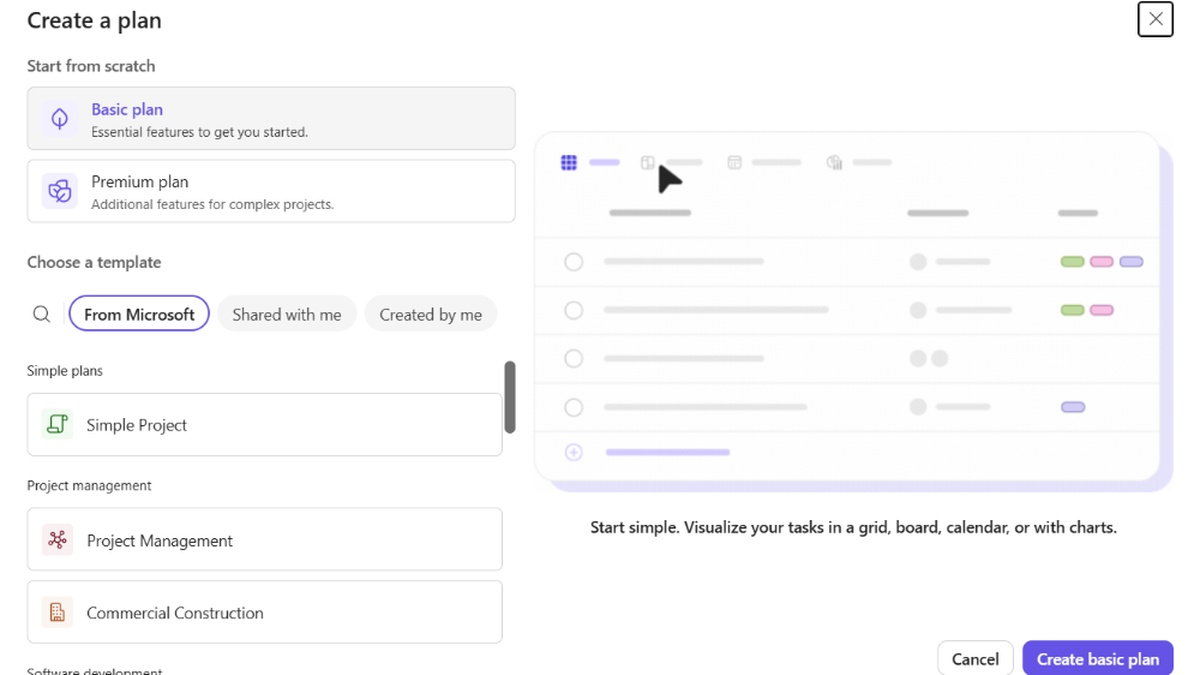
For enterprise organizations operating on corporate Entra ID infrastructure, Microsoft positions Planner as the unified task destination. Beginning in December 2026, corporate tenants will receive an updated My tasks interface integrating personal assignments with team Kanban boards.
Under this revised configuration, private tasks authored by corporate employees will reside inside dedicated private Planner plans. Navigating Microsoft To Do Retirement requires corporate teams to understand how collaborative governance rules apply across previously isolated personal work task checklists.
Crucially, existing lists and historical task entries will not automatically migrate into the revised Planner workspace. While legacy tasks remain visible through a backward-compatible view until June 30, 2027, they will vanish permanently once support concludes.
Corporate systems engineers must establish robust documentation to train internal personnel on the new collaborative workflow parameters. Users accustomed to instantaneous checkbox lists must now navigate sophisticated project boards designed primarily for distributed corporate teamwork.
System administrators should verify tenant licensing configurations to ensure all operational staff possess eligible Planner permissions. Anticipating Microsoft To Do Retirement deadlines ensures that organizations audit commercial licensing access prior to rollout to avoid operational downtime.
The operational learning curve represents significant administrative overhead for global IT infrastructure teams. Corporate workflows will undergo extensive realignment as Microsoft To Do Retirement mandates total reliance on centralized project management software tools.
Architecture and Sync Breakdown: Wunderlist Legacy Versus Modern Planner
The impending shutdown marks the final chapter of Microsoft’s landmark acquisition of 6Wunderkinder for over one hundred million dollars in 2015. Wunderlist captured global acclaim through elegant design, instantaneous cloud synchronization, and effortless cross-platform collaboration across consumer devices.
When Microsoft launched To Do in April 2017, the development team rebuilt the software on Exchange Online infrastructure. That architectural shift replaced lightweight custom sync servers with heavy enterprise messaging backends, introducing complexity while maintaining native desktop speed.
In contrast, Microsoft Planner operates entirely on modern cloud-first microservices integrated directly into Microsoft Graph API endpoints. Analyzing Microsoft To Do Retirement reveals how shifting to cloud microservices optimizes enterprise resource allocations but sacrifices lightweight responsiveness during routine task tracking.
Enterprise infrastructure scaling requires massive processing capacity across high-density computing clusters. Those tracking modern silicon advancements can explore the AMD Ryzen 7 9800X3D desktop processor to examine architectural performance leaps across cutting-edge silicon.
Comparing local SQLite caching mechanisms against browser-based cloud APIs highlights stark differences in desktop operational efficiency. Local client caching enabled instant offline responsiveness that web application frameworks struggle to reproduce across constrained network environments.
The complete retirement of the Wunderlist codebase represents a symbolic pivot away from boutique consumer application design. Enterprise priorities have thoroughly eclipsed consumer utility as Microsoft To Do Retirement concludes a decade-long software evolution.
Understanding the functional discrepancies between outgoing utilities and contemporary alternatives allows users to navigate Microsoft To Do Retirement effectively. The following matrix contrasts primary technical capabilities, desktop application availability, and pricing across prominent productivity tools.
| Productivity Suite | Native Desktop Client | Personal Account Access | Offline Sync Engine | List Hierarchy & Groups | Pricing Model |
|---|---|---|---|---|---|
| Microsoft To Do | Yes (macOS & Windows) | Yes (Free MSA Account) | Full Local SQLite Sync | List Groups and Folders | Free (Included in M365) |
| Microsoft Planner | No (Web and Teams Only) | No (Commercial Entra ID) | Limited Browser Cache | Buckets & Kanban Boards | Enterprise License Required |
| Apple Reminders | Yes (macOS Native App) | Yes (Apple Account) | Full iCloud Offline Sync | Nested Lists and Smart Tags | Free across Apple Devices |
| Todoist | Yes (Native Electron/Web) | Yes (Any Email Login) | Robust Two-Way Offline Sync | Projects, Sections, Subtasks | Free Tier / Monthly Pro |
| TickTick | Yes (macOS & Windows) | Yes (Independent Account) | Comprehensive Offline Sync | Folders, Lists, and Tags | Free Tier / Monthly Pro |
Evaluating these application characteristics exposes prominent feature deficits confronting displaced users during the Microsoft To Do Retirement transition. Technical scrutiny reveals multiple workflow regressions inherent in migrating desktop workflows to browser-based collaborative suites.
Feature Gaps and Missing Capabilities in the Microsoft To Do Retirement Shift
Migrating from dedicated client software to browser-hosted management tools introduces immediate operational limitations for professional power users. Microsoft Planner completely lacks support for list groups, a cornerstone organizational capability that enabled complex hierarchical task categorization.
Furthermore, native desktop printing and direct email-to-list generation routines will not transition to the replacement platform. As Microsoft To Do Retirement approaches, users who relied on dragging Outlook emails directly into task windows will encounter disconnected browser interfaces.
The total elimination of native Windows and macOS software binaries represents an acute regression for desktop computing ergonomics. Working within Microsoft Teams or web browser tabs consumes substantial system memory while eliminating lightweight system tray access shortcuts.
Offline operational support suffers dramatic curtailment under browser-centric task management architectures. Evaluating Microsoft To Do Retirement impacts on field staff confirms that web-dependent dashboards falter whenever field technicians lose consistent wireless internet connectivity.
File attachment constraints on private tasks introduce additional administrative friction across corporate environments. Power users managing confidential documentation will discover restrictive collaboration policies governing files attached to cloud-hosted project plans.
These technical limitations prove that enterprise consolidation frequently prioritizes unified administration over individual end-user convenience. Acknowledging these deficits during Microsoft To Do Retirement planning enables organizations to establish effective workflow workarounds.
Top Third-Party Alternatives for Displaced Task Management Users
Displaced personal users and dissatisfied corporate employees have viable alternatives across modern consumer software ecosystems. Apple Reminders stands as the premier destination for macOS and iOS hardware owners navigating Microsoft To Do Retirement without ongoing subscription fees.
Apple Reminders delivers native interactive desktop widgets, location-based automation triggers, and robust smart list filtering. Users operating inside Apple hardware ecosystems gain immediate offline synchronization backed by encrypted iCloud infrastructure.
For multi-platform environments spanning Windows, Android, and Linux, Todoist provides an exceptional consumer task management alternative. Adopting Todoist ahead of the shutdown offers natural language date parsing, nested task hierarchies, and native desktop clients.
TickTick presents another compelling destination, bundling integrated Pomodoro focus timers, habit tracking, and full calendar synchronization. Its flexible list grouping capabilities directly replicate the organizational layout cherished by veteran Wunderlist and To Do enthusiasts.
Consumers prioritizing open-source data ownership and local Markdown storage should explore Obsidian with community task plugins. Storing task databases locally ensures absolute immunity against vendor disruptions triggered by Microsoft To Do Retirement schedules.
Selecting an appropriate replacement depends heavily on individual operating system preferences and collaboration requirements. Adopting a versatile third-party tool ensures long-term resilience as Microsoft To Do Retirement invalidates legacy cloud connections.
Export Tool Limitations and Microsoft To Do Retirement Data Policies
Microsoft has pledged to deliver a dedicated data export utility prior to the final application retirement date. However, official guidance explicitly notes that export capabilities will not automatically transfer task archives into Microsoft Planner or competing software.
The planned export tool is designed primarily to fulfill regulatory compliance and data preservation obligations. As Microsoft To Do Retirement approaches, receiving raw task archives in JSON or CSV formats will require extensive manual parsing to restore task metadata elsewhere.
Subtasks, recurring schedules, and embedded file attachments often suffer corruption during generic data migration routines. Users managing thousands of archived entries should anticipate manual cleanup sessions when importing legacy data into alternative platforms.
Crucially, Microsoft clarified that application retirement does not immediately trigger server-side task database deletion. Existing cloud records will persist across Exchange servers subject to organizational data retention policies and account lifecycle rules.
Nevertheless, relying on indefinite backend preservation carries immense technical risk once user interfaces disappear permanently. Documenting active task archives before Microsoft To Do Retirement takes effect ensures that vital personal productivity records remain accessible.
Establishing independent data backups guarantees complete control over personal productivity archives. Proactive data management shields users from sudden access lockouts caused by Microsoft To Do Retirement policy enforcements.
Frequently Asked Questions
When will Microsoft To Do apps officially stop working?
Microsoft To Do apps across iPhone, iPad, Mac, Windows, Android, and web will officially retire on June 30, 2027. Under this official retirement timeline, client software will no longer sync or receive security updates.
Can personal Microsoft account holders use Microsoft Planner?
No, Microsoft Planner is restricted exclusively to commercial work and school accounts with active business licenses. Personal Microsoft accounts, including Microsoft 365 Personal and Family subscribers, cannot access Planner and must transition to third-party task applications.
Will existing To Do tasks automatically transfer to Planner?
No, existing tasks and lists will not automatically migrate into Planner plans. While commercial users can view legacy tasks in Planner until June 30, 2027, users must export or manually recreate tasks before that cutoff.
Will Microsoft release a native Planner desktop app for Mac or Windows?
Microsoft has confirmed that no native desktop applications are planned for Planner on Mac or Windows. Users must access Planner through web browsers or Microsoft Teams, losing native offline desktop synchronization capabilities entirely.
What happens to classic Outlook desktop tasks after retirement?
Classic Outlook native tasks operate on an independent MAPI Exchange pipeline and will continue functioning normally. The retirement specifically targets Microsoft To Do client applications, mobile binaries, and modern web synchronization frontends across platforms.
Definitive Verdict on the Modern Task Ecosystem Transition
The impending Microsoft To Do Retirement represents a profound strategic realignment prioritizing enterprise collaboration over standalone consumer productivity. Redmond has decisively abandoned the consumer task market, ending a celebrated design lineage that began over a decade ago with Wunderlist.
For corporate enterprises, the transition to Microsoft Planner consolidates project governance but introduces workflow regressions and heavier resource consumption. Organizations must invest in user education and audit internal licensing to navigate the mandatory migration smoothly across operational departments.
Personal account holders must take immediate ownership of their productivity data by migrating to capable third-party alternatives. Proactive preparation ensures uninterrupted daily workflows long before Microsoft To Do Retirement permanently silences client applications on June 30, 2027.
