


Table of Contents
Security researcher Abdelhamid Naceri has disclosed a critical zero-day exploit dubbed FastUnlock BitLocker Bypass affecting fully updated Windows 11 systems. The vulnerability permits physical attackers to circumvent full disk encryption protections and achieve local code execution within five minutes.
By manipulating accessibility features on locked workstations, FastUnlock BitLocker Bypass circumvents standard authentication safeguards without requiring valid credentials. The alarming discovery exposes systemic weaknesses in how Windows handles background interface processes during lock screen account recovery.
Understanding the severity of this FastUnlock BitLocker Bypass vulnerability requires analyzing how physical attack vectors interact with operating system memory and encryption states. The comparison table below highlights how FastUnlock differs from traditional physical memory and hardware bus exploits.
| Attack Vector | Authentication Boundary | Physical Access Required | Execution Privilege | BitLocker Encryption Impact |
|---|---|---|---|---|
| FastUnlock Zero-Day | Lock Screen (Pre-Auth) | Yes | WsiAccount / Local System | Complete Bypass (Active Memory Volume) |
| Cold Boot RAM Attack | Hardware Memory Bus | Yes | Physical RAM Intercept | Cryptographic Key Extraction |
| DMA Peripheral Exploit | Thunderbolt / PCIe Bus | Yes | Direct Bus Memory Injection | In-Flight Memory Corruption |
| TPM Bus Sniffing | SPI / I2C Bus Interconnect | Yes | Hardware Logic Analyzer | Plaintext Volume Master Key Sniffing |
| Stolen Offline Storage | Storage Controller Bus | Yes | Raw Disk Extraction | Protected by AES-XTS 128/256 Cryptography |
As demonstrated in the comparison matrix above, FastUnlock BitLocker Bypass operates entirely at the software interface layer rather than requiring specialized physical bus sniffing hardware. This architectural reality makes the exploit accessible to opportunistic physical intruders on untended enterprise hardware.
Windows Narrator Architecture and Lock Screen Attack Surface
The Windows accessibility subsystem has historically provided critical assistive utilities across pre-authentication environments, enabling users to engage Narrator, Magnifier, and On-Screen Keyboard tools. However, integrating interactive user interfaces into the secure lock screen context inevitably expands the local attack surface.
In modern editions of Windows 11, Microsoft refreshed the visual styling and interactive telemetry of Narrator to enhance user experience. Unfortunately, security researcher Abdelhamid Naceri discovered that this refreshed interface neglected critical isolation restrictions previously enforced against background window instantiation.
While legacy system code actively prevented Narrator from spawning interactive windows when operating under the privileged SYSTEM token, lock screen contexts lacked equivalent isolation. This omission allows FastUnlock BitLocker Bypass to initialize background application dialogues while the machine remains securely locked.
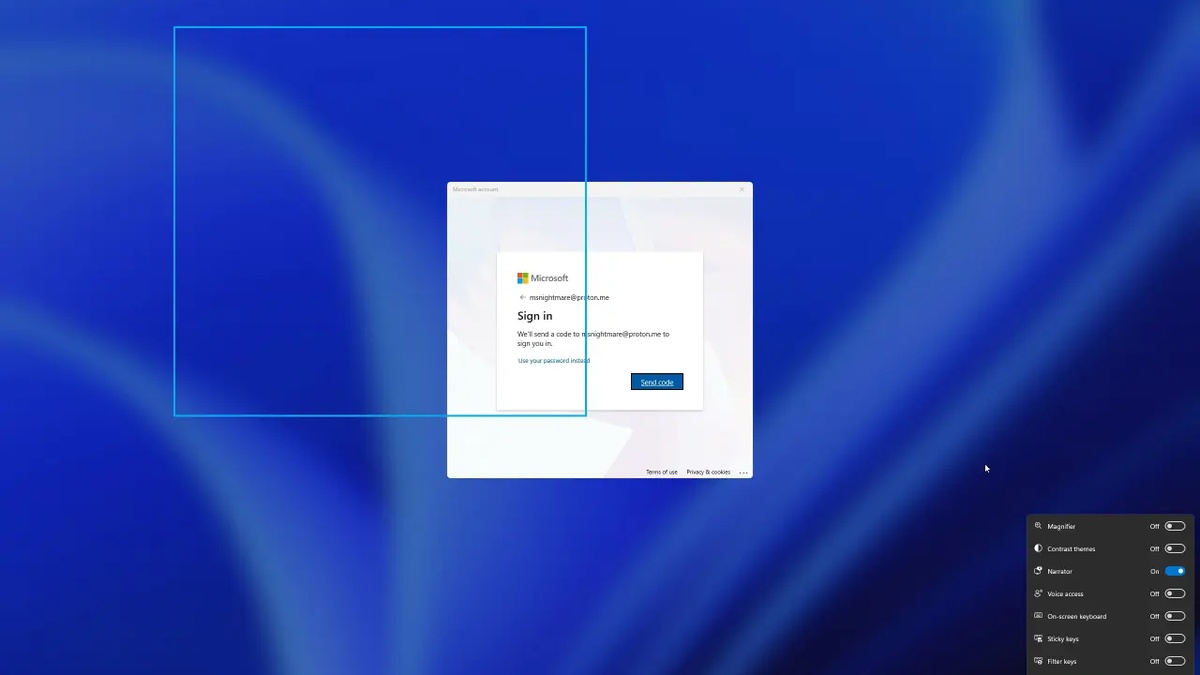
The vulnerability manifests specifically when a user clicks the standard account recovery prompts on machines linked to Microsoft online accounts. Initial investigative findings shared in Neowin’s zero-day vulnerability coverage indicate that this workflow creates an unauthenticated staging ground.
Once the account recovery dialogue initializes, pressing accessibility shortcut keybindings launches Narrator within a transient user environment known as WsiAccount. Rather than restricting input exclusively to visual speech assistance, the process exposes hidden desktop handles.
This fundamental flaw in interface sandboxing demonstrates how cosmetic feature updates can inadvertently weaken core operating system boundaries. By granting hidden interface windows active message loops, Windows creates an inadvertent stepping stone for privilege escalation.
How FastUnlock BitLocker Bypass Executes Arbitrary Code via WsiAccount
The technical core of the FastUnlock BitLocker Bypass technique relies on navigating hidden window hierarchies through keyboard accessibility shortcuts. When Narrator initializes over the locked desktop, focus automatically attaches to an invisible background window managed by the accessibility service.
Because the interactive elements remain hidden beneath the primary lock screen layer, attackers perform blind navigation utilizing the Caps Lock navigation mode. Holding Caps Lock while pressing directional arrow keys directs the invisible cursor across undocumented configuration options.
By issuing keyboard combinations, the operator activates the internal Math Reading Settings hyperlink, which immediately spawns the primary Windows Settings application in the background. At this juncture, FastUnlock BitLocker Bypass establishes a fully functional, hidden administrative configuration interface.
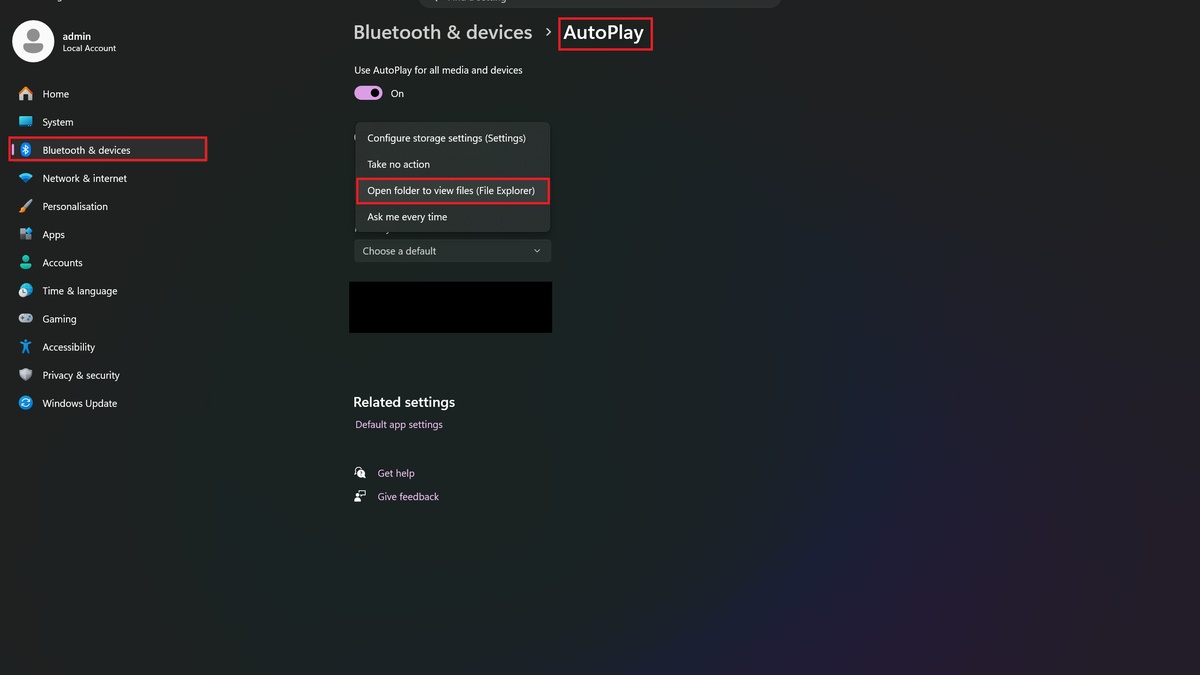
From the hidden Settings console, navigation progresses seamlessly toward the Bluetooth and Devices configuration submenu. The attacker systematically steers the invisible selection cursor into AutoPlay preferences, targeting default removable storage handling routines on the host system.
According to technical documentation published on Abdelhamid Naceri’s FastUnlock repository, configuring AutoPlay to launch File Explorer on removable drive insertion provides instant arbitrary code execution.
When an external USB drive containing arbitrary payload binaries is connected, File Explorer triggers automatically within the WsiAccount security context. The operator executes custom administrative binaries without encountering password challenges, validating the FastUnlock BitLocker Bypass execution flow.
Physical Access Vulnerability and AutoPlay Removable Storage Execution
While remote cyberattacks dominate enterprise security discussions, physical access vectors represent devastating single-point-of-failure vulnerabilities for endpoint computing devices. FastUnlock BitLocker Bypass proves that possessing physical custody of unattended hardware frequently circumvents complex cryptographic protections.
The requirement for physical presence limits mass automated exploitation across wide networks, yet poses extreme hazards in corporate and educational environments. Corporate laptops left unattended in transit hubs, conference rooms, or hotel suites become prime targets for rapid compromise.
The automated execution mechanism depends heavily on legacy AutoPlay behaviors that remain enabled by default across millions of consumer Windows installations. While modern platforms like the Apple M4 Mac mini hardware architecture enforce hardware-isolated peripheral authentication, Windows endpoints often trust external USB devices implicitly.
When an attacker mounts a crafted USB flash drive during the hijacked Narrator session, AutoPlay launches Explorer directly within WsiAccount. From there, accessibility navigation commands execute arbitrary shell scripts, installer executables, or persistent rootkit installers.
Because the operating system is fully booted and operational, security agents and antivirus software running in user space may fail to intercept this bypass. The attack leverages legitimate built-in accessibility binaries, effectively executing a living-off-the-land compromise.
This physical vector underscores the enduring principle in computer security that physical possession often equates to total system ownership. System architects must treat physical lock screens as hostile environments requiring rigorous containment controls.
Dissecting FastUnlock BitLocker Bypass Vulnerability in Windows 11 26H2
Mitigating physical exploit chains requires implementing layered administrative controls across operating system configurations and hardware firmware. The endpoint hardening matrix below evaluates defensive countermeasures designed to neutralize FastUnlock BitLocker Bypass on enterprise endpoints.
| Mitigation Layer | Group Policy / Registry Setting | Protection Scope | Implementation Complexity | Enterprise Impact |
|---|---|---|---|---|
| Disable Lock Screen Narrator | Ease of Access Lock Screen Policy | Blocks Narrator Invocation | Low | Minor Accessibility Trade-off |
| BitLocker Startup PIN Enforcement | TPM + Enhanced PIN Policy | Prevents Boot Volume Mounting | Medium | Requires User Pre-Boot Credential |
| Disable AutoPlay for Storage | Explorer Removable Media GPO | Blocks Automatic File Execution | Low | Recommended Enterprise Baseline |
| Restrict Account Reset Dialogues | Online Account Reset Interface Policy | Prevents WsiAccount Staging | Medium | Requires Managed Credential Reset |
| Kernel DMA Protection | Enforce Pre-Boot DMA Guard | Secures External PCIe Interfaces | High (Hardware Specific) | Zero Performance Penalty |
Implementing these defensive controls substantially reduces the probability of successful exploitation by eliminating the underlying interface triggers. Security teams should prioritize enforcing pre-boot authentication to ensure underlying encryption keys remain sealed until trusted credentials are provided.
Evaluating the architectural scope of FastUnlock BitLocker Bypass reveals that the vulnerability specifically impacts fully patched installations of Windows 11 26H2. Testing confirmed that the November cumulative quality updates do not resolve the underlying Narrator window isolation bug.
The persistence of this defect through consecutive monthly patch cycles highlights significant blind spots in interface regression testing. Although Microsoft previously resolved similar lock screen bypass bugs, cosmetic redesigns routinely reintroduce unmonitored execution pathways.
Crucially, the exploit mechanism requires at least one account configured on the machine to be associated with an online Microsoft Account. Systems configured exclusively with local user accounts do not display the online reset dialogue, neutralizing FastUnlock BitLocker Bypass entirely.
This architectural nuance is particularly significant as organizations evaluate operating system migration timelines following the Windows 10 lifecycle end. Upgrading enterprise fleets to modern Windows 11 builds inadvertently expands exposure to cloud-linked authentication workflows.
Furthermore, high-performance computing hardware powered by cutting-edge processors like the AMD Ryzen 7 9800X3D boots into lock screens in seconds, accelerating physical attack turnaround times for opportunistic intruders.
Until Microsoft engineers issue an out-of-band security patch, enterprise security teams must recognize that patch compliance alone does not guarantee resilience against FastUnlock BitLocker Bypass. Independent defensive audits remain essential for maintaining true endpoint protection.
Hardware Encryption Integrity and BitLocker Threat Modeling
Many IT professionals mistakenly assume that BitLocker encryption offers absolute protection against unauthorized data access on lost or stolen laptops. In reality, FastUnlock BitLocker Bypass illustrates the crucial distinction between data-at-rest encryption and runtime operating system state security.
When a Windows PC boots to the lock screen under default configurations, BitLocker automatically retrieves volume encryption keys from the hardware TPM module. Consequently, the encrypted storage drive is already mounted and operating in a fully decrypted state in RAM.
Because the volume is actively decrypted, any process that achieves code execution at the lock screen inherits direct access to protected disk partitions. FastUnlock BitLocker Bypass demonstrates how software-level authentication bypasses completely render underlying full disk encryption obsolete.
Threat modeling must distinguish between powered-off devices and machines sitting in sleep, modern standby, or active lock screen states. In active lock screen states, cryptographic boundaries shift entirely from hardware security modules to the operating system user interface.
Without additional pre-boot authentication mechanisms, such as TPM startup PINs, BitLocker functions primarily as theft protection for completely powered-down hard drives. An attacker who seizes a running or sleeping laptop bypasses cryptographic protections entirely via FastUnlock BitLocker Bypass.
Security professionals must communicate these architectural realities to corporate stakeholders to prevent unjustified reliance on baseline disk encryption. True endpoint defense requires hardening every layer of the operating system stack against interactive physical manipulation.
Defending Systems Against FastUnlock BitLocker Bypass and Narrative Flaws
Protecting enterprise and personal hardware against FastUnlock BitLocker Bypass requires implementing immediate, proactive mitigation strategies prior to official patch availability. Organizations can deploy several targeted Group Policy modifications to block the vulnerability chain completely.
The most direct immediate defense involves disabling lock screen accessibility shortcuts through Group Policy or mobile device management profiles. Restricting Narrator and Ease of Access utilities prevents attackers from invoking the vulnerable background window environment.
Additionally, administrators should enforce strict AutoPlay disablement policies across all removable media drives via computer configuration templates. Disabling AutoPlay neutralizes the secondary stage of FastUnlock BitLocker Bypass, blocking automated File Explorer launching upon USB device connection.
Enforcing BitLocker pre-boot startup PIN authentication represents another vital defensive layer against physical tampering and unauthorized booting. Requiring a cryptographic PIN before Windows initializes prevents the operating system from mounting decrypted volumes prior to explicit user authorization.
Organizations should also evaluate migrating corporate endpoints toward dedicated local administrator accounts or enterprise federated authentication models. Eliminating direct consumer Microsoft account links on workstations removes the vulnerable password reset triggers entirely.
By adopting these comprehensive defense-in-depth measures, security teams can effectively insulate endpoints against FastUnlock BitLocker Bypass. Combining administrative restrictions with rigorous physical security policies guarantees robust protection until Microsoft delivers an official patch.
Frequently Asked Questions
What is the FastUnlock zero-day vulnerability in Windows 11?
FastUnlock is a zero-day vulnerability discovered by researcher Abdelhamid Naceri that exploits Windows Narrator UI handling on locked systems. It enables physical attackers to execute arbitrary code within the pre-authentication WsiAccount context, bypassing BitLocker drive encryption without entering user credentials.
Does FastUnlock BitLocker Bypass require physical access to the target PC?
Yes, the FastUnlock exploit strictly requires physical access to the computer keyboard and display. An attacker must interact directly with the lock screen interface, trigger account recovery dialogues, and navigate Narrator shortcuts to launch executables from external USB flash drives.
Are local Windows accounts vulnerable to FastUnlock BitLocker Bypass?
Systems utilizing solely local user accounts are immune to this attack vector. FastUnlock relies on triggering the Microsoft account online password reset workflow on the lock screen, which initializes the specialized WsiAccount environment required to hijack the hidden Narrator settings window.
Why does BitLocker fail to prevent the FastUnlock attack?
BitLocker automatically decrypts system volumes during early boot when utilizing default TPM-only authentication profiles. Because the storage volume is already unlocked and mounted in memory at the lock screen, arbitrary code executed via WsiAccount can freely access all decrypted system files.
How can system administrators protect Windows 11 machines before Microsoft patches FastUnlock?
Enterprise administrators should enforce BitLocker pre-boot startup PINs, disable AutoPlay across removable USB drives, and restrict accessibility shortcuts on lock screens via Group Policy. Transitioning sensitive systems to local administrator accounts also prevents initialization of vulnerable account recovery interfaces.
Final Security Verdict on FastUnlock and Windows 11 Defenses
The discovery of the FastUnlock BitLocker Bypass zero-day highlights the enduring vulnerability of complex operating systems to physical access exploits. Despite extensive investments in hardware encryption and secure boot chains, overlooked user interface flaws can completely dismantle endpoint protections.
Microsoft’s failure to isolate updated Narrator window handles within locked user contexts underscores the necessity of continuous security auditing. IT administrators must recognize that relying solely on default operating system configurations leaves sensitive endpoints exposed to rapid physical compromise.
Until an official security patch arrives in upcoming cumulative updates, implementing aggressive administrative mitigations remains imperative. Organizations that enforce startup PINs and disable lock screen accessibility features will maintain resilient defenses against FastUnlock BitLocker Bypass.
