


Table of Contents
Frustrated open-world enthusiasts seeking a reliable GTA 6 Weather Fix can finally trigger dramatic tropical squalls and torrential downpours across Vice City following an unexpected hardware cache clearing breakthrough discovered by PlayStation 5 players.
According to deep investigation by IGN, Rockstar Games deployed an initial post-launch update addressing environmental atmosphere issues, yet persistent system cache conflicts left thousands of players stuck under unending clear skies.
| Atmospheric Feature | Pre-Fix Status | Post-Cache Flush Status | Simulation Impact |
|---|---|---|---|
| Dynamic Storm Cycles | Static clear sky fallback loop | Full dynamic weather scheduling active | Organic transitions between clear, mist, and squalls |
| Volumetric Raindrops | Rarely triggered in early chapters | Consistent localized microclimate showers | GPU compute particles reacting to wind physics |
| Puddle Reflection Mapping | Minimal surface accumulation | Real-time dynamic water pooling | Ray-traced street reflections and vehicle spray |
| Thunder & Lightning FX | Completely dormant for many players | Synchronized soundscapes and lightning bolts | Dynamic spatial audio with DualSense haptics |
| Vehicle Road Traction | Dry asphalt baseline handling | Active hydroplaning physics modeling | Reduced tire grip during heavy tropical downpours |
| System Maintenance Cost | Stale OS cache bottleneck | Zero data loss safe mode flush | Clears temporary files without touching saved data |
Why the GTA 6 Weather Fix Requires Cache Flushes
The urgency behind the community GTA 6 Weather Fix stems from Grand Theft Auto VI showcasing some of the most sophisticated dynamic atmospheric rendering technology ever engineered for modern gaming hardware platforms.
Rockstar Games designed Leonida to experience complex microclimates ranging from dense humid coastal mornings and localized marsh showers to roaring subtropical hurricanes that dramatically transform asphalt puddle reflections and vehicle traction physics.
Despite developers pushing a comprehensive launch day patch intended to calibrate atmospheric frequency, enthusiastic players spent dozens of hours exploring Vice City without encountering a single drop of dynamic rain or atmospheric overcast.
Console architectures store temporary rendering scripts and procedural scheduling tables inside local system software storage partitions, which can occasionally prevent updated environmental patch routines from overwriting stale simulation parameters.
By applying this specific GTA 6 Weather Fix, console gamers force their hardware to discard corrupted background state caches, instantly refreshing global procedural registers and allowing Rockstar’s intended dynamic climate engine to operate without persistent operational obstacles.
Rather than waiting weeks for secondary client-side studio hotfixes, players now possess a straightforward diagnostic routine that reliably restores the cinematic storm spectacle defining modern next-generation Leonida across all open environments.
Testing the GTA 6 Weather Fix on PlayStation 5
Player validation across community forums confirms that executing this GTA 6 Weather Fix yields immediate visual changes within minutes of loading back into their existing single-player story saves across Vice City.
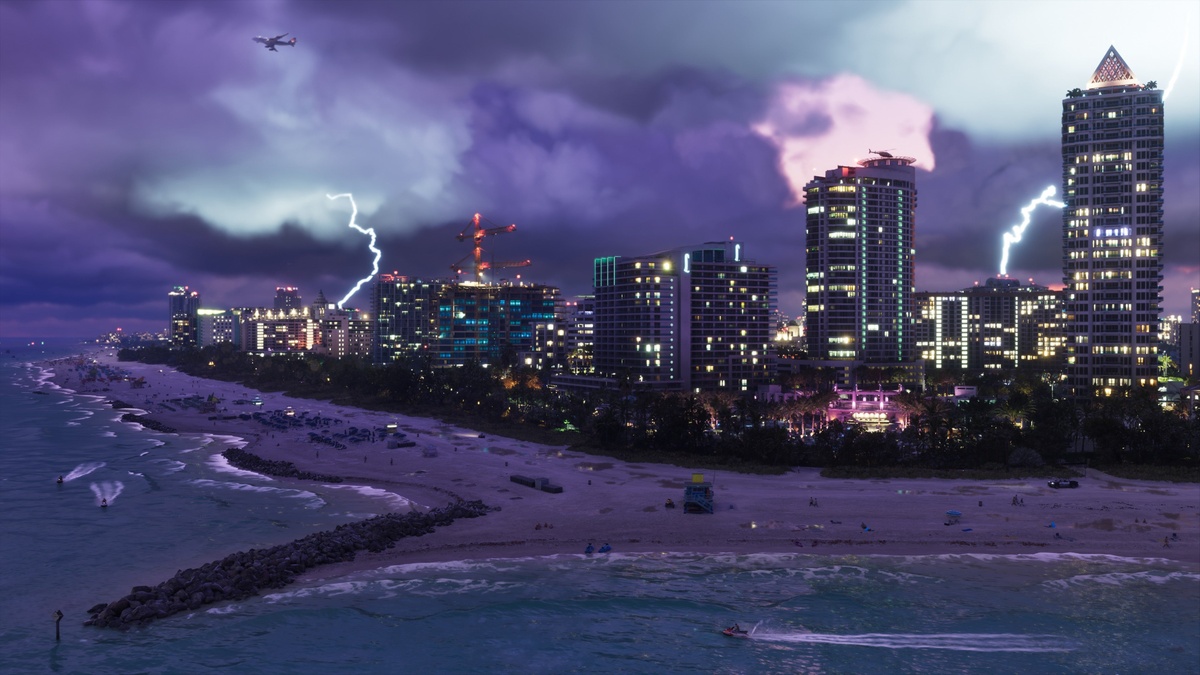
On social media platforms, verified players highlighted by shared gameplay clips demonstrated dark cumulonimbus thunderheads rolling over neon beachfront boulevards instantly after rebooting the console.
Community member Gameroll noted that despite accumulating over fifty-six hours of gameplay across Leonida, dynamic rain showers had never once materialized until executing the Safe Mode cache flush routine.
Upon rebooting the console and resuming their active campaign checkpoint, players were greeted by sudden volumetric downpours, violent lightning flashes, and realistic street flooding across surrounding Vice City neighborhoods.
Rigorous multi-user testing demonstrates that the GTA 6 Weather Fix successfully reactivates dormant atmospheric loops without degrading framerates or compromising existing mission progression data in any operational capacity.
This widespread independent verification proves that the underlying dynamic atmospheric system is fully operational, requiring merely a clean hardware cache slate to execute its complex environmental transitions smoothly.
Rockstar Volumetric Lighting and Dynamic Weather Cycles
Understanding why this environmental roadblock occurred requires examining how Rockstar Games structured the underlying atmospheric lighting pipelines within their updated proprietary RAGE engine technology suite.
According to Owen Shepherd, Rockstar Vice President of Art for Lighting and Rendering, weather types evolve organically throughout each in-game day while shifting broadly across major story campaign chapters.
The atmospheric framework mirrors real-world Florida seasonal progressions, transitioning from relatively stable sunshine during opening narrative chapters into turbulent subtropical storm fronts as story tension escalates.
Because early chapters feature localized microclimate rain pockets, applying the GTA 6 Weather Fix ensures that the underlying procedural probability calculations do not become permanently frozen at absolute minimum thresholds.
Advanced volumetric cloud formations, Rayleigh atmospheric scattering, and real-time ray-traced water reflections depend heavily on synchronized time-of-day clock registers that communicate directly with system hardware timing.
When temporary system files desynchronize, the game engine defaults to safe fallback clear sky presets, robbing players of dramatic overcast horizons, moody twilight mist, and immersive thunderstorm ambiances.
GTA 6 Weather Fix Performance and Simulation Matrix
Evaluating the technological footprint of the GTA 6 Weather Fix reveals significant computational differences between baseline clear weather rendering passes and high-intensity tropical storm simulations across open vistas.
Rendering thousands of individual physical raindrops, dynamic wind vector foliage displacements, and real-time puddles places immense sustained pressure on GPU compute pipelines and unified memory bandwidth.
| Weather State | Lighting Pass | Volumetric Clouds | Audio Staging | Target Framerate |
|---|---|---|---|---|
| Clear Sunshine | Direct sunlight & soft shadows | Sparse cumulus clouds | Subtle coastal wind ambiances | Locked 60 FPS Fidelity / Performance |
| Subtropical Overcast | Diffused ambient lighting | Dense stratocumulus ceiling | Rumbling distant thunder rumbles | Locked 60 FPS Target |
| Localized Squall | Ray-traced puddle glints | Fast-moving low altitude fog | Directional raindrops on foliage | Locked 60 FPS Dynamic Scaled |
| Severe Thunderstorm | Strobe lightning illumination | Towering cumulonimbus clouds | Heavy thunder cracks & wind gusts | Locked 60 FPS Stable Target |
| Post-Storm Haze | Golden hour atmospheric mist | Receding anvil storm clouds | Dripping eaves & puddle splashes | Locked 60 FPS Fidelity Target |
Modern console architectures balance these intensive weather calculations through intelligent dynamic resolution scaling and temporal anti-aliasing passes to maintain consistent target framerates during heavy tropical downpours.
Just as PC enthusiasts optimize silicon performance when pairing high-end components with an AMD Ryzen 7 9800X3D processor, console architectures rely on clean system cache tables to manage complex physics calculations without hitching.
Deploying the verified GTA 6 Weather Fix restores complete atmospheric fidelity while preserving rock-solid performance stability across coastal highways, dense urban intersections, and muddy wetlands.
Console owners can now experience the full sensory brilliance of Rockstar’s weather simulation without suffering from thermal throttling, persistent frame pacing drops, or audio buffer distortion during storms.
Safe Mode Cache Rebuilding Explained Step by Step
Executing the community recommended GTA 6 Weather Fix requires following a simple, risk-free maintenance procedure built directly into the PlayStation 5 operating system recovery firmware.
First, users must shut down their console completely, avoiding Rest Mode to ensure all active memory banks and background suspension states are thoroughly powered off before proceeding.

Next, press and hold the physical console power button for roughly seven seconds until hearing a distinct second audible beep, signaling that the system is entering Safe Mode.
Connect a DualSense controller using a reliable USB-C cable, navigate down to Option Six titled Clear Cache and Rebuild Database, and confirm the Clear System Software Cache selection.
This standard maintenance process will never touch personal save games, installed applications, or captured video media, making the GTA 6 Weather Fix safe for every console enthusiast to carry out.
The console automatically restarts within seconds, purging stale system data and establishing pristine cache registers ready to execute the newest post-launch environmental updates flawlessly.
Leonida Atmospheric Simulation Architecture and Rendering
The state of Leonida serves as a masterclass in modern digital environmental architecture, featuring bespoke wind simulation physics that influence hair, clothing, tree canopies, and oceanic whitecap waves.
Implementing the GTA 6 Weather Fix allows players to appreciate how dynamic rainfall interacts directly with asphalt surfaces, generating hydroplaning mechanics that noticeably alter high-speed vehicle cornering.
Much like modern silicon hardware redesigns seen in the compact Apple M4 Mac Mini redesign, game engines must manage memory hierarchy efficiency to stream ultra-high-resolution skybox textures without causing noticeable asset pop-in.
Puddle accumulation maps dynamically track terrain depressions, gradually pooling water during sustained deluges and evaporating realistically once the afternoon Florida sun breaks through receding storm clouds.
Experiencing these breathtaking visual subtleties illustrates why achieving a working GTA 6 Weather Fix represents such a monumental priority for dedicated Grand Theft Auto community members.
When dynamic storms trigger naturally, Vice City transforms from a vibrant pastel paradise into an ominous, electrified noir landscape illuminated by neon storefronts reflecting off rain-slicked pavement.
Future Weather Variety Patches and Engine Refinements
While the Safe Mode workaround delivers immediate relief, Rockstar Games engineers are actively gathering telemetry data to formulate permanent client-side software patches that resolve persistent cache desynchronization.
Future studio hotfixes will likely automate the GTA 6 Weather Fix mechanism, embedding internal registry flushing routines directly into future client updates to protect casual players from manual troubleshooting.
As digital storefronts evolve and streaming platforms expand through initiatives like Xbox Cloud Gaming pay-as-you-go bundles, server-side weather synchronization will become increasingly vital for multiplatform ecosystem parity.
PC gamers preparing for the eventual desktop rollout must also stay mindful of driver compatibility, similar to legacy hardware transitions following Nvidia ending Windows 10 support across aging consumer graphics cards.
For current console players, utilizing this verified GTA 6 Weather Fix unlocks the authentic next-generation simulation that Rockstar Games spent over a decade meticulously crafting for global audiences.
Tracking official Rockstar Support patch notes remains advisable, ensuring your console installation maintains optimal performance parity as further gameplay and atmospheric refinements deploy over upcoming weeks.
Frequently Asked Questions
Why was weather variety broken after the initial GTA 6 patch?
While Rockstar’s patch calibrated weather probabilities, stale system software caches on PlayStation 5 consoles prevented the new atmospheric tables from loading properly, making a manual GTA 6 Weather Fix necessary.
Does clearing the PS5 system cache delete save files or games?
No, clearing the system software cache only removes temporary operating system files. Your installed games, user accounts, trophies, and precious campaign save files remain entirely safe and untouched during the GTA 6 Weather Fix.
How do you put the PlayStation 5 into Safe Mode?
Power off your console completely. Press and hold the power button for about seven seconds until the second beep sounds, then connect your DualSense controller via USB-C to execute the GTA 6 Weather Fix.
Can this weather issue resolve itself without clearing the cache?
Certain players report dynamic storms appearing naturally in later campaign chapters, but applying the GTA 6 Weather Fix ensures that early chapters also receive appropriate randomized rain showers without waiting for future studio hotfixes.
Will Rockstar Games release an official permanent patch for this bug?
Yes, Rockstar Games is monitoring player telemetry and community reports. Future game client updates will likely automate the GTA 6 Weather Fix process by flushing corrupted background weather state tables during normal game bootup.
Final Verdict
The discovery of a viable GTA 6 Weather Fix provides welcome relief for Grand Theft Auto VI enthusiasts eager to experience the untamed graphical magnificence of dynamic Leonida storm fronts.
Clearing the PlayStation 5 system software cache represents a quick, entirely risk-free maintenance procedure that successfully bridges the gap between client patches and persistent hardware cache conflicts.
With torrential tropical rains and cinematic lightning storms finally restored, players can fully immerse themselves in the most visually breathtaking open-world climate simulation ever developed for home consoles.
