


Table of Contents
Desktop customization enthusiasts celebrating the return of alternate dock orientations can finally rejoice as the Windows 11 Vertical Taskbar prepares to receive native auto-hide support, resolving one of the most frustrating user experience omissions in modern Windows.
Following years of community feedback, Microsoft engineering leaders confirmed that the missing behavior will arrive in upcoming Insider builds, ensuring that docked side panels disappear seamlessly during active application workflows without hogging valuable horizontal screen space.
| Windows Feature Version | Taskbar Dock Orientations | Auto-Hide Capabilities | Search & Flyout Alignment | Underlying UI Framework |
|---|---|---|---|---|
| Windows 10 Legacy | Bottom, Top, Left, Right | Supported Across All 4 Edges | Native Screen Margin Anchoring | Legacy Win32 Explorer Shell |
| Windows 11 Launch (21H2) | Bottom Only (Centered or Left) | Bottom Edge Exclusively | Fixed Bottom Center / Left | Modern XAML / WinUI 3 |
| Windows 11 Current (2026) | Bottom, Left, Right, Top | Restricted to Bottom Dock | Partial Side Flyout Alignment | Hybrid XAML Composition Engine |
| Upcoming Windows 11 Build | Bottom, Left, Right, Top | Full Auto-Hide on All Sides | Synchronized Margin Flyouts | Refined WinUI 3 Edge Compositor |
Microsoft Confirms Auto-Hide for the Windows 11 Vertical Taskbar
The modern Windows Shell has faced fierce scrutiny since the platform debuted with a rigid bottom-only interface, forcing multi-monitor power users to rely on unsupported third-party modification utilities to reposition primary application icons.
When Microsoft recently restored side docking mechanics across production channels, enthusiasts discovered an infuriating limitation: the Windows 11 Vertical Taskbar remained permanently pinned to the display edge without any option to automatically retract out of sight.
According to direct engineering statements highlighted by Windows Central, Windows Shell Head of Product Tali Roth confirmed on social platforms that official auto-hide functionality is actively underway.
Roth verified that developers are engineering dedicated retraction routines for both left and right screen borders, eliminating the static visual obstruction that previously broke immersion during full-screen design work and gaming sessions.
While the engineering team has not committed to an inflexible public launch date, internal validation cycles suggest that the revised Windows 11 Vertical Taskbar behavior will enter public flighting shortly through upcoming developer previews.
This milestone reflects a broader cultural pivot inside Redmond, as software leadership systematically dismantles arbitrary user interface restrictions that alienated workstation professionals during the early lifecycle of Windows 11.
Why Power Users and Developers Demanded Vertical Taskbar Repositioning
Modern desktop displays have shifted overwhelmingly toward panoramic aspect ratios, making traditional horizontal taskbars an inefficient use of scarce vertical display real estate across daily coding environments.
Software developers compiling complex code repositories frequently navigate hundreds of vertical lines inside integrated development environments, where every single line of text visibility materially accelerates debugging velocity and syntactic comprehension.
By repositioning system controls to the left margin, the Windows 11 Vertical Taskbar preserves crucial vertical pixels while utilizing abundant horizontal margins that frequently sit completely empty in text editors and document processors.
Despite internal telemetry suggesting only a minor fraction of mainstream users customize taskbar orientation, those who do represent the platform’s most vocal developers, creative professionals, and enterprise systems administrators.
As explored in our analysis of Nvidia ending Windows 10 support for PC gamers, millions of desktop veterans are finally migrating to Windows 11, demanding complete feature parity with legacy desktop paradigms.
Failing to support collapsible side docks forced enterprise power users into frustrating compromises, highlighting why Microsoft chose to elevate the Windows 11 Vertical Taskbar auto-hide project into an active engineering sprint.
Ultrawide Display Productivity with the Windows 11 Vertical Taskbar
The meteoric rise of ultrawide 21:9 and super-ultrawide 32:9 curved gaming monitors has completely transformed professional desktop ergonomics across gaming rigs and creative editing suites alike.
On a 49-inch panoramic display stretching over five thousand horizontal pixels, an unyielding bottom bar creates excessive neck strain as users repeatedly glance downward toward distant system tray clocks and status icons.
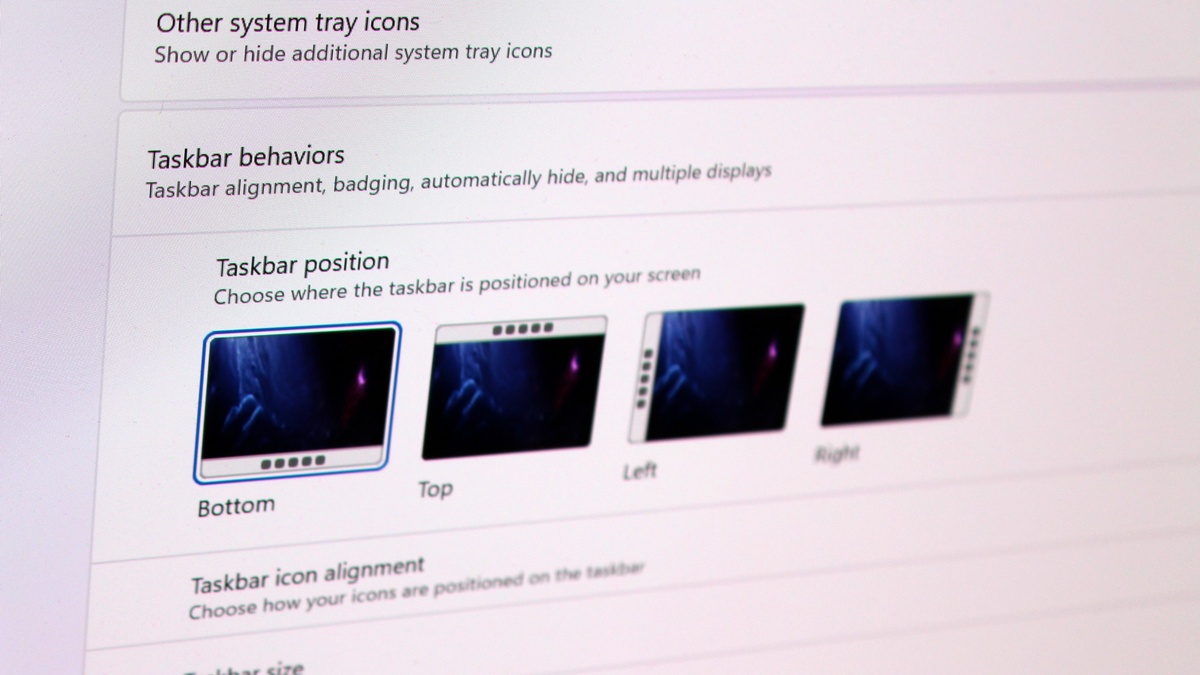
Deploying the Windows 11 Vertical Taskbar on expansive ultrawide setups aligns essential app launchers comfortably within primary peripheral vision, dramatically reducing unnecessary eye travel across massive curved glass surfaces.
However, keeping that vertical dock permanently visible wastes hundreds of horizontal pixels during split-screen window tiling, creating an awkward visual imbalance when tiling multiple browser windows side by side.
Pairing high-end desktop workstations powered by the AMD Ryzen 7 9800X3D gaming processor with an auto-hiding side dock provides an expansive, borderless computing canvas tailored for extreme productivity.
Once the upcoming update lands, the Windows 11 Vertical Taskbar will glide silently offscreen until hovered, delivering the cleanest panoramic workspace possible without sacrificing instant application accessibility.
Shell Alignment Overhaul: Windows Search and Action Center Adaptations
Enabling seamless auto-hide mechanics on lateral screen boundaries involves far more than simply animating the primary XAML container off the physical edge of a user’s display.
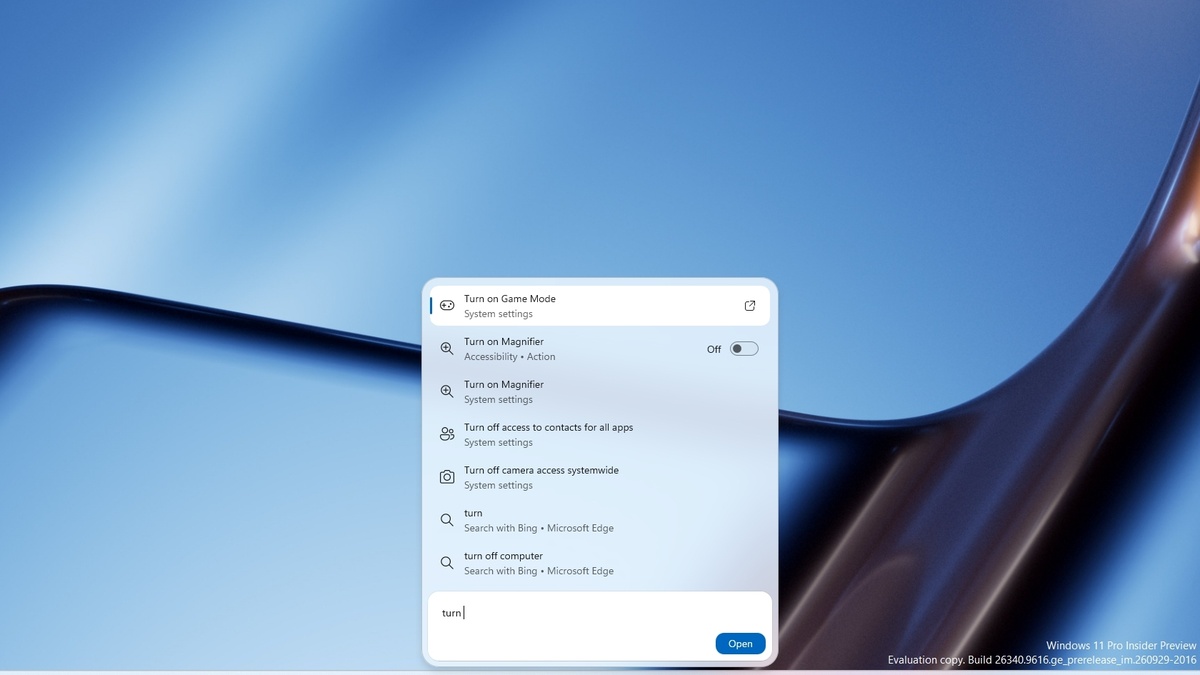
Under the hood, the modern Windows Shell anchors numerous auxiliary flyouts to the taskbar coordinate frame, including the Windows Search interface, Notification Center, Copilot sidecar, and Quick Settings cluster.
In current exploratory builds, positioning the Windows 11 Vertical Taskbar along the side edge causes several secondary flyouts to misalign or render awkwardly across opposite monitor quadrants, confusing user muscle memory.
Microsoft engineers are actively rewriting anchoring transforms to guarantee that popups slide smoothly from the correct screen margin alongside the newly stabilized Windows 11 Vertical Taskbar auto-retraction animations.
Similar to how Apple refined spatial window anchoring on the compact Apple M4 Mac Mini desktop redesign, Microsoft is prioritizing fluid transition physics that eliminate jarring micro-stutters during rapid pointer interactions.
Coordinating these interconnected shell components ensures that when users summon the hidden dock, companion flyouts present coherent visual hierarchy rather than clipping abruptly behind active application windows.
Technical Evolution: Comparing Windows 10 Legacy Docking to Windows 11 Architecture
To understand why implementing this capability took several years, one must appreciate the monumental architectural divergence separating legacy Windows 10 from the modernized Windows 11 shell environment.
Legacy iterations of Windows relied on decades-old Win32 Explorer codebase, where taskbar docking was tied directly to native desktop window manager hooks and primitive GDI rendering pipelines.
| Display Resolution & Ratio | Bottom Taskbar Usable Area | Pinned Vertical Dock Area | Auto-Hidden Vertical Dock Area | Vertical Pixel Gain |
|---|---|---|---|---|
| 1080p Standard (1920×1080 16:9) | 1920 x 1032 px (95.5%) | 1856 x 1080 px (96.6%) | 1920 x 1080 px (100.0%) | +48 Vertical Pixels |
| 1440p QHD (2560×1440 16:9) | 2560 x 1386 px (96.2%) | 2488 x 1440 px (97.1%) | 2560 x 1440 px (100.0%) | +54 Vertical Pixels |
| 4K UHD (3840×2160 16:9) | 3840 x 2096 px (97.0%) | 3760 x 2160 px (97.9%) | 3840 x 2160 px (100.0%) | +64 Vertical Pixels |
| Ultrawide UWQHD (3440×1440 21:9) | 3440 x 1386 px (96.2%) | 3368 x 1440 px (97.9%) | 3440 x 1440 px (100.0%) | +54 Vertical Pixels |
| Super Ultrawide (5120×1440 32:9) | 5120 x 1386 px (96.2%) | 5048 x 1440 px (98.6%) | 5120 x 1440 px (100.0%) | +54 Vertical Pixels |
When engineering Windows 11, Microsoft scrapped the Win32 taskbar entirely, rebuilding the entire user interface surface in modern modern XAML and WinUI 3 to enable fluid animations and responsive touch gestures.
While this rewrite modernized visual aesthetics, it stripped away legacy docking features, making the realization of the modern Windows 11 Vertical Taskbar an intricate engineering task requiring net-new compositor physics.
Legacy DeskBands and third-party toolbar extensions remain permanently deprecated, but the core docking and auto-hide behaviors of the Windows 11 Vertical Taskbar are finally achieving parity with traditional desktop expectations.
Engineers must ensure that these responsive WinUI physics scale effortlessly across variable refresh rate displays, avoiding dropped frames when high-framerate gaming monitors trigger mouse hover transitions.
How the Windows 11 Vertical Taskbar Reclaims Lost Desktop Workspace
Quantifying screen real estate illustrates precisely why workstation enthusiasts celebrate the arrival of auto-hide functionality on lateral display boundaries across modern desktop environments.
On a standard 16:9 4K UHD monitor running at 3840 by 2160 pixels, a standard bottom taskbar consumes approximately 48 to 60 vertical pixels continuously throughout every computing session.
Docking the Windows 11 Vertical Taskbar vertically shifts that footprint to horizontal space where widescreen panels possess abundant margin, preserving precious vertical height for code editors and timeline tracks.
Activating auto-hide unlocks absolute full-screen utility, reclaiming 100 percent of the physical panel for foreground software without requiring cumbersome manual fullscreen toggles or window border hiding.
For digital artists working inside digital audio workstations or video grading suites, the Windows 11 Vertical Taskbar disappears completely until needed, providing an immaculate canvas free of distracting illuminated taskbar badges.
This clean operational mode ensures that productivity software utilizes every single diode of modern OLED panels, simultaneously mitigating long-term static interface burn-in risks on premium hardware.
Public Rollout Expectations and Windows Insider Channel Deployment
As Microsoft Shell engineers finalize internal edge-detection routines, testing will follow the standard staggered deployment pipeline established across the broader Windows Insider development channels.
Enthusiasts tracking updates via official Windows Insider Blog announcements can expect initial auto-hide bits to drop first within the Canary and Dev flighting rings.
These preliminary flights will evaluate edge-trigger sensitivity, ensuring that users do not inadvertently summon the Windows 11 Vertical Taskbar while manipulating scrollbars or clicking adjacent window borders in foreground apps.
Following community telemetry gathering and iterative bug fixing, the feature will graduate into Beta channel builds before arriving in a forthcoming cumulative Windows 11 feature enablement package.
Users will be able to toggle the behavior directly inside Settings under Personalization by checking the renewed auto-hide option alongside their customized Windows 11 Vertical Taskbar orientation preferences.
By systematically addressing long-standing desktop customization complaints, Microsoft is cementing Windows 11 as a refined, flexible operating system capable of satisfying demanding professional power users.
Frequently Asked Questions
When will auto-hide arrive for the Windows 11 Vertical Taskbar?
Microsoft confirmed that auto-hide support for the Windows 11 Vertical Taskbar is currently in development and coming soon to Windows Insider Canary and Dev preview channels before broader general availability.
Can you dock the Windows 11 taskbar to any side of the screen?
Yes, once the update rolls out, you will be able to position your taskbar along the left, right, top, or bottom edges and enable auto-hide across any chosen orientation.
Will legacy Windows 10 toolbars return with the vertical taskbar?
No, legacy third-party DeskBands and custom toolbars remain unsupported in the modern WinUI 3 architecture, though modern system widgets and core notification flyouts will integrate seamlessly.
Why do developers prefer a vertical taskbar over a bottom dock?
Vertical docks preserve scarce vertical pixels on 16:9 and 21:9 displays, keeping more code lines and document text visible while positioning app launchers closer to natural horizontal eye paths.
How do you enable taskbar auto-hide in Windows 11 settings?
Navigate to Windows Settings, open Personalization, click Taskbar Behaviors, choose your preferred screen alignment, and check the box labeled Automatically hide the taskbar once the update arrives.
Final Verdict: Modernizing Desktop Ergonomics in Windows 11
The forthcoming introduction of auto-hide functionality for the Windows 11 Vertical Taskbar represents an essential ergonomic victory for power users who refuse to let operating system constraints dictate their daily computing workspace.
By rectifying the stubborn limitations of its modern XAML shell, Microsoft demonstrates a welcome willingness to heed community feedback and restore beloved productivity workflows that made desktop computing powerful.
As ultrawide monitors dominate modern workstation setups, this impending update transforms the Windows 11 Vertical Taskbar into the ultimate desktop layout for developers, creators, and enthusiasts demanding uncompromised screen real estate.
