


Table of Contents
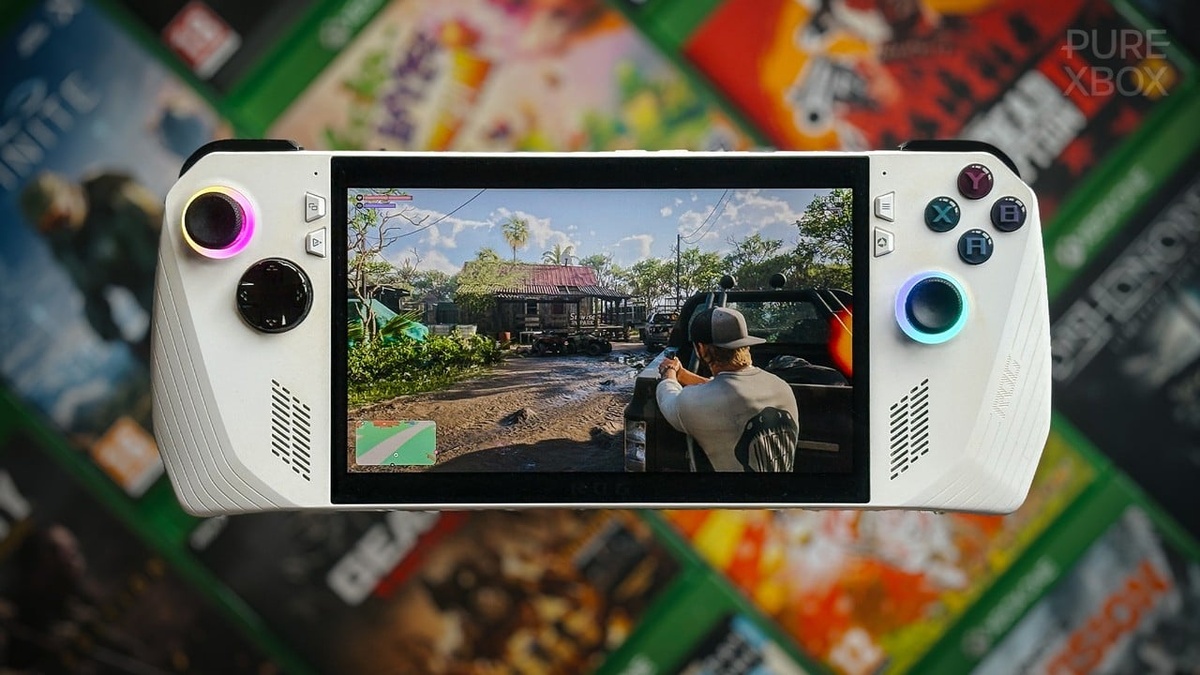
The global launch of Grand Theft Auto VI is driving record console engagement, and GTA 6 Xbox Remote Play has emerged as an unexpected standout feature. Players are using local hardware streaming to enjoy Vice City across portable devices.
With Rockstar Games maintaining launch exclusivity on home consoles, PC enthusiasts face a protracted wait. By leveraging native console streaming protocols, Xbox owners are unlocking responsive handheld gameplay on Windows portables, mobile phones, and tablets without desktop hardware.
| Streaming Platform | Host Processing Engine | Supported Client Devices | Subscription Requirement | Target Latency Envelope | Optimal Use Case |
|---|---|---|---|---|---|
| Xbox Remote Play (Local Network) | Local Xbox Series X|S console silicon | Windows 11 portables, iOS, Android | Completely Free (Zero fee) | 15 ms – 28 ms | In-home couch freedom, private screens |
| Xbox Remote Play (Cellular / Remote) | Home Xbox console via UDP traversal | Cellular smartphones, ROG Ally, tablets | Completely Free (Zero fee) | 35 ms – 55 ms | Commuting, hotel stays, mobile hotspot |
| Xbox Cloud Gaming (xCloud) | Microsoft Azure datacenter blades | Web browsers, Smart TVs, mobile apps | Game Pass Ultimate ($19.99/mo) | 45 ms – 75 ms | Playing without owning Xbox console |
| PlayStation Remote Play (Baseline) | Local PlayStation 5 console hardware | PS Portal, iOS, Android, PC clients | Completely Free (Zero fee) | 20 ms – 35 ms | Sony ecosystem handheld streaming |
Console Streaming Breakthroughs: How GTA 6 Xbox Remote Play Bypasses the PC Delay
When Rockstar Games deployed Grand Theft Auto VI worldwide today, millions of players rushed to boot up their consoles. However, the conspicuous absence of a day-one Windows PC port left desktop enthusiasts facing an indefinite commercial delay.
To bridge this platform gap, resourceful players turned to Microsoft’s native console streaming architecture. Instead of waiting months for an official PC edition, gamers discovered that GTA 6 Xbox Remote Play delivers high-fidelity Vice City action directly to portable Windows handhelds.
As originally reported by Pure Xbox, early adopters flooded community forums with glowing praise for the feature. Enthusiasts highlighted how seamless peer-to-peer streaming transformed their Xbox Series X into a localized render farm.
Unlike traditional cloud gaming services that execute code on distant server blades, GTA 6 Xbox Remote Play streams directly from your personal console hardware. This distinction grants immediate access to installed titles without queuing behind congested enterprise datacenter servers during peak launch.
Social channels witnessed viral gameplay clips demonstrating remarkably fluid open-world combat on portable hardware. Gamers who initially dismissed streaming protocols as novelty tools are now treating GTA 6 Xbox Remote Play as an indispensable component of their next-generation gaming lifestyle.
Network Architecture and Bitrate Allocation: Eliminating Handheld Input Latency
Underpinning GTA 6 Xbox Remote Play performance is Microsoft’s customized peer-to-peer streaming protocol, which prioritizes low latency over excessive graphical compression buffers. The Xbox operating system dynamically modulates video bitrates between twelve and twenty megabits per second depending on local network interference.
Input polling operates over an independent, high-frequency telemetry channel that transmits controller instructions directly back to the host console. This decoupled pipeline bypasses heavy video frame buffering, maintaining an ultra-responsive control envelope that feels natural during intense police pursuits.
Similar to raw hardware tuning examined in our analysis of the AMD Ryzen 7 9800X3D gaming processor, latency reduction requires optimized memory caching. Microsoft engineered specialized hardware video encoders into Series X silicon to compress raw frames in under four milliseconds.
When operating over local Wi-Fi 6 networks, total motion latency with GTA 6 Xbox Remote Play frequently measures beneath thirty milliseconds. This rapid response allows players to aim sniper rifles, execute high-speed vehicle handbrake turns, and navigate crowded Vice City intersections with surgical precision.
Adaptive packet recovery algorithms further safeguard against transient network packet drops. If wireless signal fluctuates briefly, the GTA 6 Xbox Remote Play engine drops non-essential audio packets or minor color bits rather than introducing catastrophic frame stutter or complete session disconnects.
Hardware Ecosystem Compatibility: Running GTA 6 Xbox Remote Play on Windows Handhelds
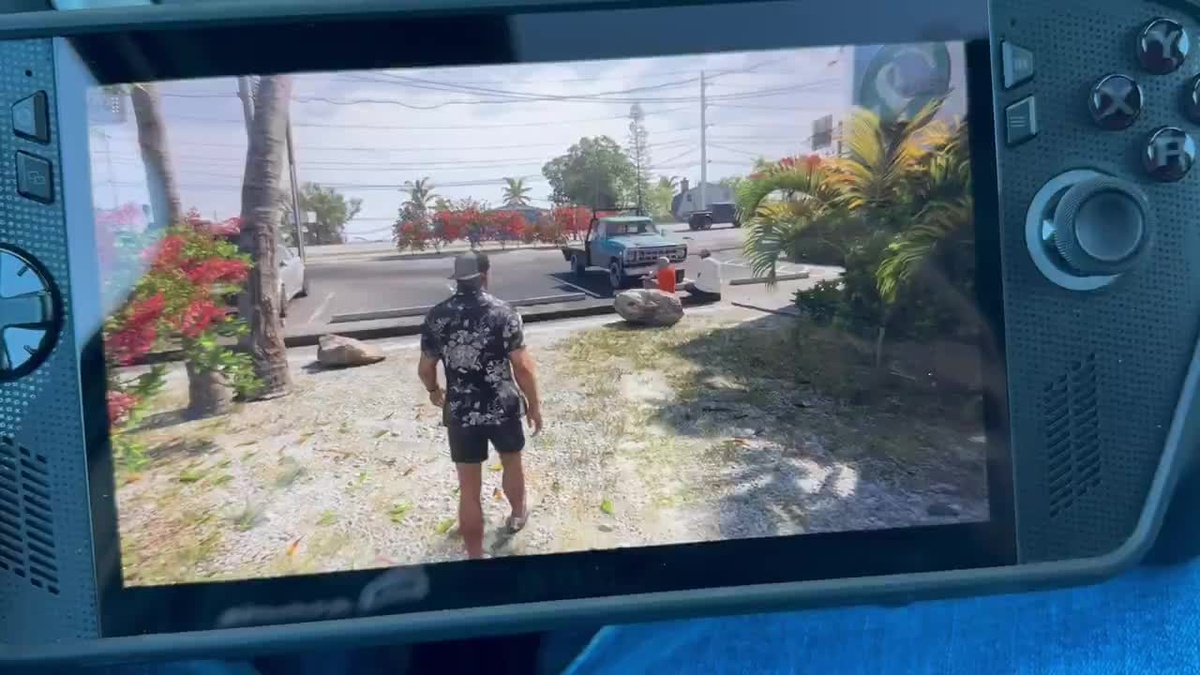
The proliferation of dedicated Windows PC gaming handhelds has created the ultimate hardware canvas for console streaming. Devices like the ASUS ROG Ally X, Lenovo Legion Go, and Steam Deck boast vibrant high-refresh displays tailored for portable play.
Because GTA 6 Xbox Remote Play relies on video decoding rather than local graphical rendering, handheld devices experience virtually zero thermal throttling or fan noise. The Xbox Series X handles ray tracing and geometry rendering while the handheld operates as an efficient client.
This computational division delivers substantial advantages over native execution, GTA 6 Xbox Remote Play excels. Handheld batteries that typically drain within ninety minutes during heavy AAA gaming easily survive upwards of five to six hours when only decoding lightweight H.264 video streams.
Furthermore, Windows handheld owners benefit from native Xbox controller mapping baked directly into their operating systems. Shoulder triggers provide authentic analog tension, while haptic vibration motors translate the rumble of high-powered sports cars directly into the player’s palms.
For players traveling away from living room televisions, GTA 6 Xbox Remote Play provides a desktop-grade gaming experience without lugging cumbersome gaming laptops. It turns any comfortable corner, hotel room, or patio lounge into an immersive portal straight into Leonida.
Cellular Tethering and Remote Wi-Fi Optimization: High-Speed Mobile Performance
| Network Architecture | Connection Protocol / Band | Downstream Bandwidth | Motion-to-Photon Latency | Target Resolution | Framerate Stability |
|---|---|---|---|---|---|
| Local Wired Ethernet + Wi-Fi 6 | 5.0 GHz / 6.0 GHz 802.11ax | 50+ Mbps Local Speed | 18 ms – 25 ms | Native 1080p | 60 FPS Rock Solid |
| Dual-Band Home Wi-Fi 5 | 5.0 GHz 802.11ac Band | 25 – 40 Mbps Local | 28 ms – 38 ms | Dynamic 1080p | 60 FPS Stable |
| 5G Ultra Wideband Hotspot | Sub-6 GHz / mmWave 5G | 30 – 75 Mbps Remote | 38 ms – 50 ms | Adaptive 1080p / 720p | 55 – 60 FPS |
| 4G LTE Advanced Tethering | LTE Cat 16 Cellular Band | 15 – 25 Mbps Remote | 55 ms – 75 ms | Dynamic 720p | 45 – 60 FPS |
| Public Hotel / Hospitality Wi-Fi | 2.4 GHz Shared Network | 5 – 12 Mbps Remote | 85 ms – 120 ms | Compressed 720p | Transient Frame Drops |
While local local-area network streaming offers pristine fidelity, GTA 6 Xbox Remote Play over cellular networks represents the true test of engineering resilience. Impressively, community members report stable, crisp performance while streaming Vice City over 5G cellular smartphone hotspots.
Connecting over external networks routes telemetry through encrypted Microsoft signaling servers to establish direct UDP NAT traversal between devices. Once the direct handshake concludes, gameplay traffic flows directly between your mobile client and home console with minimal overhead.
As discussed in our architectural evaluation of Xbox cloud gaming distribution models, network stability remains paramount for GTA 6 Xbox Remote Play sessions. Maintaining a home broadband upload speed of at least twenty megabits ensures flawless off-site gameplay transmission.
Players frequently report sneaking short play sessions during work breaks or mundane daily commutes without experiencing disruptive visual artifacting. The GTA 6 Xbox Remote Play client seamlessly downsamples resolution to 720p if cellular bandwidth drops, prioritizing continuous action over sharp pixel density.
Configuring port forwarding or enabling UPnP on your home router further reduces connection negotiation times. These simple networking adjustments eliminate double-NAT complications, ensuring instantaneous wake-on-LAN functionality whenever you initiate a GTA 6 Xbox Remote Play session from anywhere globally.
Direct Hardware Comparison: GTA 6 Xbox Remote Play Versus PlayStation Remote Play

The arrival of Grand Theft Auto VI has reignited platform rivalries, particularly regarding how Sony and Microsoft implement remote play ecosystems. While Sony promotes its dedicated PlayStation Portal accessory, Microsoft champions an open software approach across arbitrary consumer hardware.
Sony’s PlayStation Remote Play delivers excellent visual clarity when paired with DualSense haptic feedback, but limits users to specific proprietary hardware or software wrappers. In contrast, GTA 6 Xbox Remote Play runs natively across Windows, iOS, Android, and web browsers.
Much like software transition hurdles covered in our review of NVIDIA operating system legacy deprecations, open platform access drives widespread user adoption. Gamers appreciate utilizing hardware they already own rather than purchasing separate two-hundred-dollar streaming tablets.
Independent benchmark testing conducted by Digital Foundry reveals encoding benchmarks for GTA 6 Xbox Remote Play across both console architectures. However, Xbox Remote Play frequently exhibits superior packet loss recovery when handling unstable wireless mesh connections.
By eliminating proprietary hardware barriers, Microsoft allows players to turn cheap Android tablets or premium gaming handhelds into capable GTA 6 displays. The accessibility of GTA 6 Xbox Remote Play is earning the company immense goodwill across competitive gaming communities worldwide.
Display Scaling and Color Space Mapping: Preserving HDR Fidelity on Smaller Screens
Vice City’s visual design relies heavily on vivid neon lighting, atmospheric haze, and dynamic wet-weather reflections across asphalt streets. Deploying GTA 6 Xbox Remote Play requires sophisticated tone mapping to avoid washed-out contrast on compact portable screens.
In GTA 6 Xbox Remote Play, the client utilizes intelligent display scaling to downsample native 4K console output into 1080p and 720p viewports. Subpixel anti-aliasing preserves razor-sharp vehicle edges and distant street signage without introducing shimmering aliasing artifacts across high-density panels.
Similar to visual processing advancements explored in our Apple M4 Mac mini architecture review, dedicated color pipelines ensure accurate color grading. Standard dynamic range displays receive accurate tone curves that prevent crushed shadow detail in dark alleys.
On premium OLED handheld displays, GTA 6 Xbox Remote Play produces astonishing visual punch with pure inky blacks and vibrant neon hues. The contrast between Vice City’s glowing palm trees and dark coastal waters looks breathtakingly cinematic in the palm of your hands.
With GTA 6 Xbox Remote Play, text legibility in user interface menus, mobile phone messages, and minimap navigation markers also scales dynamically. Players can read mission objectives, weapon wheel statistics, and dialogue subtitles effortlessly without squinting or altering their natural viewing distance.
Battery Consumption and Thermal Profiles: Portable Endurance During Extended Sessions
One of the most consequential benefits of offloading heavy 3D rendering to your home console is massive handheld energy savings. Processing open-world physics, complex AI pedestrians, and ray-traced lighting natively would deplete mobile batteries in under an hour.
By contrast, hardware video decoding operates within hardware blocks during GTA 6 Xbox Remote Play that draw between three and five watts of power. This whisper-quiet efficiency keeps handheld devices completely cool to the touch throughout lengthy multi-hour criminal escapades.
For mobile phone users utilizing snap-on mobile controllers like the Backbone One or Razer Kishi, thermal metrics during GTA 6 Xbox Remote Play impress. Smartphones remain cool without triggering aggressive thermal CPU throttling that typically ruins native mobile gaming sessions.
Extended endurance empowers gamers to undertake massive cross-country heists, boat deliveries, and aerial missions without being chained to wall chargers. You can lounge comfortably on your sofa, bed, or balcony while enjoying uncompromised current-generation graphical fidelity.
This transformative combination of battery longevity, thermal comfort, and console horsepower redefines modern gaming mobility. It demonstrates that intelligent network streaming can rival native execution, providing an extraordinary alternative for exploring Rockstar’s expansive virtual playground.
Frequently Asked Questions
What is Xbox Remote Play and how does it stream GTA 6?
Xbox Remote Play allows players to stream installed games directly from their Xbox Series X|S console to mobile devices, tablets, or Windows PCs. Unlike cloud gaming, rendering occurs locally on your own console hardware for minimum latency.
Can I play GTA 6 on Steam Deck or ROG Ally via Xbox Remote Play?
Yes, players can stream GTA 6 to Windows handhelds like the ROG Ally using the official Xbox application. Steam Deck owners can also stream via third-party tools like Greenlight or the official Xbox web interface.
Does streaming GTA 6 over Remote Play require Xbox Game Pass Ultimate?
No, Xbox Remote Play is a completely free built-in feature of the Xbox ecosystem. You do not need an active Xbox Game Pass Ultimate subscription because you are streaming directly from your privately owned console hardware.
What internet speed is recommended for smooth GTA 6 console streaming?
Microsoft recommends at least a twenty megabit per second download speed on the client device and an equivalent upload speed on your home console. Local 5GHz Wi-Fi or wired Ethernet provides the lowest input latency.
Can you stream GTA 6 away from home using cellular data?
Yes, Xbox Remote Play supports external remote streaming over 5G and 4G LTE cellular connections. Stable cellular reception enables crisp 720p or 1080p gameplay with minimal latency while commuting or traveling away from home.
Final Verdict: Why Console Streaming Elevates the Open-World Experience
The overwhelming community acclaim for console streaming during the launch of Grand Theft Auto VI proves the enduring value of Microsoft’s open hardware strategy. Rather than restricting players to living room televisions, remote play liberates gamers to enjoy Vice City everywhere.
By delivering responsive input polling, intelligent bandwidth scaling, and remarkable battery efficiency across third-party handhelds, Microsoft has turned an underrated feature into an essential launch-day companion. It successfully fills the temporary void created by the lack of a native PC port.
As millions continue exploring the sun-soaked streets of Leonida, console streaming stands as a triumphant technical achievement in modern game distribution. Whether relaxing on the couch or commuting across town, players have discovered the ultimate way to experience Rockstar’s magnum opus.
