


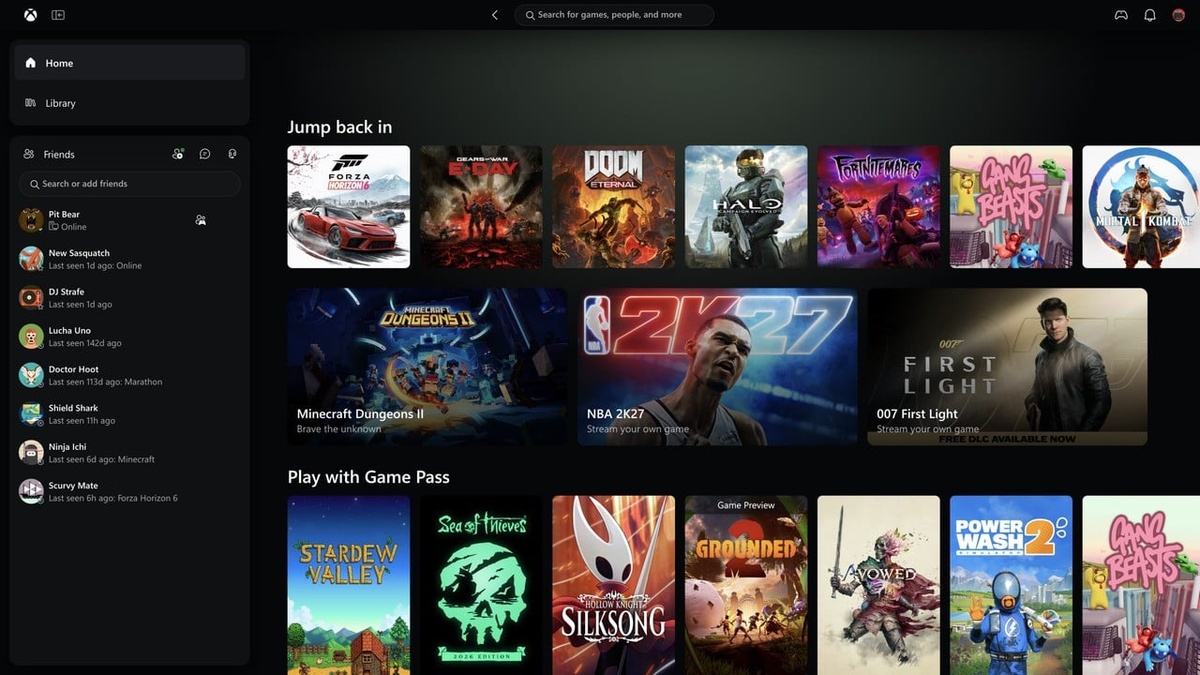
Microsoft has officially released the comprehensive Xbox PC App Upgrade to members of the Xbox Insider program, initiating a ground-up performance transformation engineered to eliminate persistent interface latency and streamline catalog navigation for millions of desktop gamers worldwide.
Featuring application launch times that are up to 60 percent faster alongside overhauled storefront responsiveness, the updated client arrives alongside major cloud gaming enhancements as reported by Pure Xbox and confirmed across early preview telemetry on The Verge.
| Subsystem / Feature | Legacy Xbox PC App | Modernized Xbox PC App Upgrade | Architectural Innovation | User Experience Benefit |
|---|---|---|---|---|
| Cold Launch Latency | Slow initialization (>4.5s) | Up to 60% Faster Boot | Optimized runtime container | Instant desktop game launching |
| Store & Game Pass Pages | Sluggish asset pop-in | Up to 50% Faster Loading | Streamlined caching pipeline | Frictionless catalog discovery |
| In-App Navigation Windows | Noticeable frame drops | Up to 65% Faster Rendering | Lightweight UI threading | Fluid multi-window browsing |
| Library Organization | Basic static grid layout | Dynamic filters & categories | Integrated collection taxonomy | Effortless collection management |
| Social & Friends Hub | Secondary detached panel | Integrated primary navigation rail | Persistent social services API | One-click party & chat access |
| Search Engine | Fragmented individual queries | Unified Omni-Search System | Universal multi-index query parser | Instant titles, DLC, and friend lookups |
| Handheld Optimization | Desktop-only cursor reliance | Compact Mode & Gamepad UX | Controller-first input abstraction | Flawless ROG Ally & Legion Go play |
| Cloud Streaming Hub | Isolated browser web portal | Unified Cross-Device Interface | Responsive web layout engine | Consistent TV, PC, & VR streaming |
Table of Contents
1. Speed & Responsiveness: Rebuilt Architecture Cuts Launch Times by 60%
For years, desktop players voiced frustration over sluggish navigation inside the legacy Electron-based client, making this Xbox PC App Upgrade a critical technical milestone for Microsoft’s broader Windows gaming ecosystem strategy and user retention efforts.
Internal Microsoft engineering benchmarks reveal that cold application launches now execute up to 60 percent faster, while core operational destinations including the Home dashboard, Store pages, and Game Pass library hubs load 50 percent faster.
Additionally, modal dialogue windows and contextual sub-menus open up to 65 percent faster, virtually eliminating the micro-stutter that historically plagued the Windows client during intensive library browsing or rapid checkout transactions across diverse hardware configurations.
This dramatic responsiveness uplift mirrors the generational throughput leaps observed in high-performance hardware, similar to the efficiency gains highlighted in our AMD Ryzen 7 9800X3D gaming CPU specs architecture breakdown for modern desktop systems.
By stripping out redundant runtime overhead and streamlining asset rendering pipelines, this Xbox PC App Upgrade provides immediate tangible value for desktop enthusiasts who prioritize lightweight, instant-launch software that respects system memory allocations and background processing power.
2. Modernized Library Ecosystem: Streamlined Sorting, Dynamic Filtering, and Game Cards
Beyond underlying raw speed optimizations, the Xbox PC App Upgrade overhauls the primary visual interface, introducing modernized game cards, refined typography, and intuitive animations that make sprawling personal digital software collections substantially easier to scan and organize.
A completely redesigned Library tab introduces dynamic sorting parameters and granular filtering controls, allowing players to filter installed local titles, cloud-streamable titles, add-ons, and subscription entitlements without navigating through cumbersome nested drop-down menus.
Social functionality has also migrated directly into the core primary navigation rail, providing instant one-click access to active friend rosters, party voice chat sessions, and live multiplayer activity broadcasts directly from the main desktop viewport.
Rather than treating friends lists as detached secondary overlay panels, this integrated social layout embedded within the Xbox PC App Upgrade keeps cooperative communities tightly connected, making squad assembly and session matchmaking effortless across diverse gaming sessions.
The aesthetic cohesion represents Microsoft’s broader design language evolution, unifying fluent design aesthetics with rapid keyboard and mouse ergonomic principles to reduce unnecessary clicking and minimize visual clutter for everyday computer users.
3. Universal Search Architecture: Instant Cross-Indexing Across Windows
Search functionality receives an exhaustive architectural rebuild under the new Xbox PC App Upgrade, replacing fragmented query boxes with a centralized omni-search engine that indexes games, downloadable expansions, downloadable content, and community player profiles concurrently.
Gamers can now input partial keywords to instantly surface relevant installed titles, available Game Pass catalog inclusions, and friends currently playing matching titles, drastically speeding up everyday navigation across expansive digital storefronts.
Much like unified hardware architectures discussed in our Apple M4 Mac mini redesign analysis, integrated software indexing eliminates siloed queries, creating an intuitive desktop environment where discovering fresh interactive content requires minimal cognitive friction.
The omni-search pipeline operates locally with smart caching mechanisms, ensuring that search queries deliver instantaneous auto-complete suggestions without imposing heavy bandwidth loads or triggering unnecessary cloud latency during peak server hours.
By synthesizing discovery, storefront commerce, and community connections into a unified search experience, the Xbox PC App Upgrade transforms routine application usage into a fluid, highly responsive desktop entertainment command center.
4. Handheld PC & Controller Mode: Engineered for Windows Gaming Portables
A pivotal strategic pillar of the Xbox PC App Upgrade centers on portable gaming PCs, addressing the exploding popularity of Windows handheld hardware such as the Asus ROG Ally, Lenovo Legion Go, and Ayaneo devices.
The updated client introduces an intelligent Compact Mode and overhauled controller navigation schemas, enabling seamless directional pad traversal, large font scaling, and optimized touch targets tailored specifically for compact seven-inch and eight-inch mobile displays.
As older operating platforms reach obsolescence, detailed in our report on how Nvidia ends Windows 10 support for PC gamers, modern Windows 11 handheld optimization has become paramount for mainstream PC hardware manufacturers.
| Ecosystem Platform | Target Hardware | Interface Mode | Input Architecture | Primary Delivery Pipeline |
|---|---|---|---|---|
| Desktop PC Client | Windows 11 / Windows 10 Desktops | Full Expanded Desktop View | Keyboard, Mouse & Controller | Local NVMe Storage & Win32/UWP |
| Windows Handheld | Asus ROG Ally, Lenovo Legion Go | Compact Handheld UI Mode | Native Gamepad & Touch Gestures | Local SSD Installation & SD Card |
| Web Browser Cloud | Chromium, Safari, Edge Browsers | Responsive Desktop Web Grid | Gamepad, Touch & Mouse Direct | Azure Cloud Streaming Protocol |
| Smart TV Applications | Samsung, LG, Fire TV Sticks | Consolized 10-Foot UI Grid | Bluetooth Wireless Controllers | Low-Latency Cloud Edge Servers |
| Spatial VR Headsets | Meta Quest 2, 3, and 3S | Virtual Massive 2D Display | Touch Controllers & Gamepads | Immersive 2D Cloud Streaming |
Controller navigation within the Xbox PC App Upgrade bypasses traditional desktop mouse cursor emulation, supplying natural gamepad bumpers and trigger shortcuts that mirror the intuitive console dashboard experience gamers expect on dedicated television hardware.
This focus on ergonomics guarantees that whether playing at a high-end multi-monitor battlestation or on a handheld device while traveling, the modernized software client delivers consistent, effortless user interaction across all modern form factors.
5. Unified Cloud Gaming Interface: Web, Smart TV, and Spatial Headset Parity
Simultaneously rolling out alongside the desktop client improvements, the Xbox PC App Upgrade rollout coincides with an overhauled browser and web-based interface for Xbox Cloud Gaming, establishing cross-device UI parity across computers, Smart TVs, and spatial headsets.
The refreshed cloud gaming interface features a unified library hub that consolidates both purchased personal cloud titles and Game Pass streaming libraries into a single accessible portal, as analyzed in our guide on Xbox Cloud Gaming pay as you go models.
Desktop browsing mode expands layout spacing across ultra-wide monitors and high-resolution panels, ensuring that cloud streaming catalogs utilize available screen real estate efficiently without excessive vertical scrolling or compressed UI elements.
Accessibility options also expand significantly, introducing full dark and light mode customization alongside five distinct high-contrast display profiles designed to support gamers with diverse visual sensitivities across web, mobile, and television environments.
This synchronized cloud deployment bridges the gap between local PC execution and remote server streaming, reinforcing how the Xbox PC App Upgrade initiative serves as an expansive foundation for Microsoft’s unified multi-platform entertainment ecosystem.
Frequently Asked Questions
What are the primary performance gains in the new Xbox PC App Upgrade?
The latest Xbox PC App Upgrade launches up to 60 percent faster, while Store and Game Pass sections load 50 percent faster, and in-app navigation windows open 65 percent quicker compared to previous legacy versions.
Who currently has access to test the Xbox PC App Upgrade?
The software update is currently rolling out exclusively to registered Xbox Insider program participants on Windows PCs, with a broader public rollout scheduled once preview feedback telemetry is validated.
How does the updated Xbox PC app improve Windows handheld gaming?
The app includes an enhanced Compact Mode with native gamepad navigation, larger touch targets, and controller button mappings optimized for devices like the Asus ROG Ally and Lenovo Legion Go.
What cloud gaming enhancements are paired with the Xbox PC App Upgrade?
Xbox Cloud Gaming receives a refreshed web interface with unified cloud library tabs, expanded desktop browsing modes, and five new accessibility high-contrast visual themes across Smart TVs and VR headsets.
Will installed games and settings carry over to the Xbox PC App Upgrade?
Yes, all existing installed game directories, settings profiles, save game cloud data, and Xbox achievement progress migrate automatically when the Xbox PC App Upgrade update installs on your Windows device.
Final Verdict: Transforming the Windows Gaming Experience
The comprehensive Xbox PC App Upgrade addresses long-standing community criticisms by delivering a substantially faster, leaner, and more cohesive desktop application that dramatically reduces operational friction for Windows PC gamers.
By harmonizing desktop speed, handheld gamepad ergonomics, and cross-platform cloud streaming under a unified visual umbrella, Microsoft proves its ongoing commitment to elevating the PC gaming platform to premier flagship status.
As the preview expands from Insider rings to general availability, this Xbox PC App Upgrade sets an exemplary standard for desktop gaming launchers, blending high-speed responsiveness with powerful cross-platform community features for the entire industry.
